Guide
Modern Work Management: A Practical Guide for 2025
A buyer-facing guide to modern work management — the definition, a 5-stage framework, and how teams cut the coordination tax that eats real productivity.
A buyer-facing guide to modern work management — the definition, a 5-stage framework, and how teams cut the coordination tax that eats real productivity.
A regional marketing team I'll call Northbeam (a scenario, not a customer) runs eleven live campaigns across six clients. Their boards are immaculate. Every card has an owner, a due date, a label. And every Monday at 9am, the team lead spends ninety minutes reconciling those boards against what actually happened over the weekend — because the board says one thing and the inbox, the spreadsheet, and the three Slack threads say another.
That ninety minutes is the real story of modern work management. The work got done. The coordination of the work — finding it, syncing it, confirming it, re-explaining it — is what bled the morning dry. This guide is about that gap: what modern work management actually is, the framework that fixes it, and how to measure whether you closed it.
Work management is the planning, organizing, and execution of tasks and projects to hit business goals. That much hasn't changed since the first Gantt chart.
What's changed is the scope of the problem. Classic project management assumed a project was a bounded thing with a start, an end, and a manager who held the whole picture in their head. Modern work is not bounded. It's continuous, cross-functional, and spread across a dozen tools, each holding a fragment of the truth. The plan lives in one place, the conversation in another, the files in a third, the schedule in a fourth.
So modern work management is less about managing tasks and more about managing the connective tissue between tasks — the handoffs, the status, the context that has to travel from the person who finished a thing to the person who needs it next. When people say "we have a productivity problem," they almost never mean their team can't do the work. They mean the work can't find its way through the team.
"Your best people are forced to do the work of glue."
— WorkElateThat distinction is the whole game. A tool that helps you write a task faster is a project-management tool. A system that makes sure the right task reaches the right person with the right context, automatically, is a work-management system. The second is what 2025 demands.
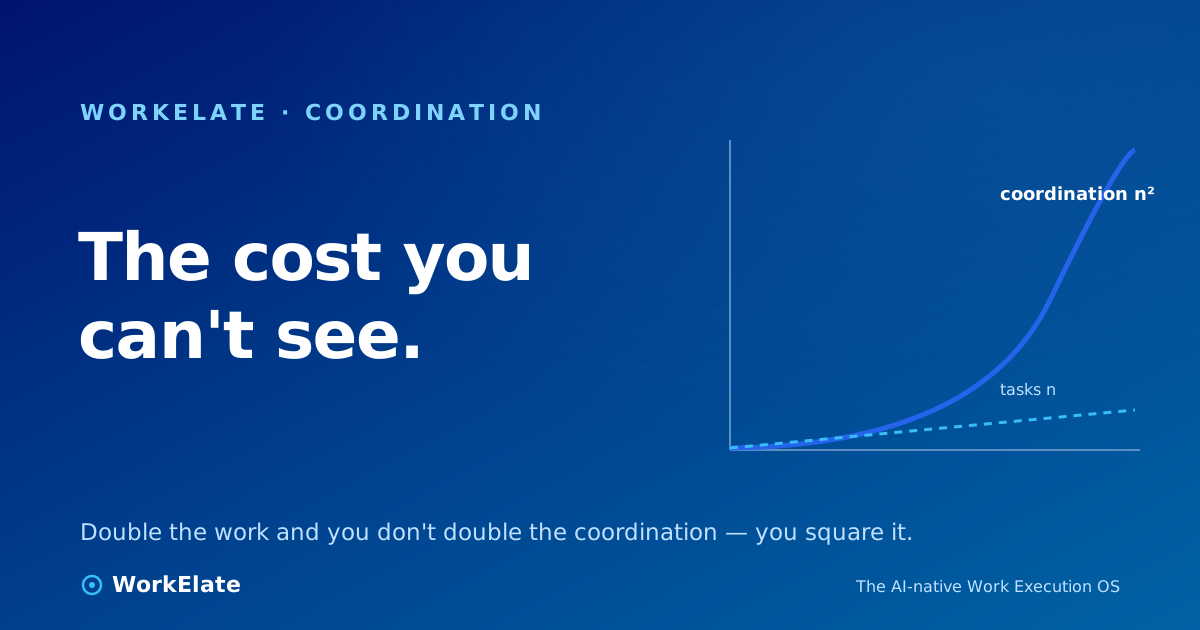
Here's the uncomfortable arithmetic. Add a person to a team and you add one worker. But you add a connection to every other person — the lines of coordination grow with the square of the team, not the headcount. Five people have ten possible connections. Ten people have forty-five. The work scales linearly; the coordination scales like n².
That's why a team can double its tools and its headcount and feel slower. The productive hours-per-person didn't drop because anyone got worse at their job. They dropped because every new person, project, and app added more seams to manage — and a seam is where context falls through.
Notice what isn't on that strip: "too many tools." The villain isn't the count. You need a spreadsheet and an inbox and a whiteboard and a calendar — they do different jobs, and a single mega-app that does all of them badly is worse than eleven good ones. The villain is that those eleven surfaces don't share a brain. The spreadsheet doesn't know the deadline moved. The calendar doesn't know the client replied. So a human walks the context from one to the next, by hand, all day. That walking is the coordination tax.
For a longer treatment of why this tax is the hidden line-item in every team's budget, see the real cost of a task is coordination.
A framework should be small enough to remember and ordered so each step earns the next. Here are five stages. Run them in order — automating a broken workflow just makes the break faster, and prioritizing work you can't see is guessing.
The instinct is to consolidate apps. Resist it. The thing to centralize is the picture — a single front door where the state of work is assembled, even if the work itself lives in a spreadsheet here and a board there. The question to ask a tool: "When something changes in app A, does app B find out without a human telling it?" If yes, you've centralized the picture. If no, you've just bought another silo with a nicer logo.
Most teams re-invent the same process every time it occurs, because it was never written down. A client onboarding, a campaign launch, a sprint review — each has a shape. Name the stages, the gates, and the handoffs once. Now the workflow is a thing that can be assigned, tracked, and improved, instead of a fresh negotiation each Tuesday.
Be honest about what automation can and can't take. It can't take judgment — which campaign to kill, which client to call. It can take the motion around the judgment: categorizing the incoming task, drafting the reminder, rolling up the status, booking the slot. That mechanical slice is usually a third to two-fifths of the day. Claim that slice and you've given every person back the hours they were spending as a human router.
Transparency is not a virtue poster; it's a mechanism. When project status, blockers, and decisions are visible by default, the status meeting dies a natural death, because its only purpose was to make the invisible visible once a week. Visibility also pushes decisions down — a person who can see the whole board can decide without escalating.
Only now does prioritization work, because only now can you see everything you're choosing between. Use the Eisenhower Matrix to split urgent from important, or OKRs to tie tasks to outcomes, or RICE to score features. The specific framework is less important than the discipline of running it on a complete picture rather than the loudest three things in your inbox.
Every tool now claims AI. Most of it is a chat box inside one app that can summarize what's already in that app. That's useful, but it doesn't touch the coordination tax, because the tax lives between apps — exactly where a single-app chatbot is blind.
AI moves the ceiling on work management only when it does three things most copilots can't:
This is the line between an AI work OS that's replacing project management and a chatbot with a project-management logo. The first sees your whole work-graph and quietly does the coordination; the second makes you do it slightly faster. WorkElate's approach is one orchestrating intelligence — we call it WAO — sitting above the apps rather than inside any one of them, so the board, the inbox, and the calendar finally share a brain. For why this shape is replacing the old category entirely, see work systems are eating SaaS.
▶ Watch on WorkElate See coordination handled across apps, not inside one youtube.com/@WorkElate · videoId: TODO — swap when publishedYou can't manage what you don't measure, and most teams measure output while the bottleneck is coordination. Track four numbers, and review them monthly:
If you only adopt one new metric from this guide, adopt the last one. Sample it: ask the team to flag, for one week, every block of time spent chasing status, reconciling tools, or re-explaining context. That number is your coordination tax, in hours, and it's the budget you're trying to reclaim.
Tools and frameworks set the ceiling; culture decides how close you get to it. Three habits matter most. Protect focused time — a calendar full of meetings is a team that does its real work after hours. Default to writing things down — a decision in a meeting is a decision three people will remember differently; a decision in a visible artifact is one everyone can see. And let teams shape their own workflows — the people doing the work know where the seams are better than any manager mandating a process from above.
What's the difference between work management and project management?
Project management handles a bounded effort with a start, end, and owner. Work management handles continuous, cross-functional work spread across many tools and people — its central problem is coordination between tasks, not the execution of any single one.
Do I need fewer tools to manage work better?
No. Different jobs need different tools — that's healthy. The problem isn't the number of tools, it's that they don't share state, so people become the glue between them. Fix the disconnection, not the count.
Where should I start if my team is overwhelmed?
Stage 1: centralize the picture, not the apps. Get one place where the true state of work is assembled, then standardize your top three recurring workflows. Don't automate until those two are done.
What can AI realistically automate in work management?
The mechanical slice — categorizing, scheduling, reminding, rolling up status — roughly a third to two-fifths of the day. It can't take judgment calls, and you shouldn't want it to. The strongest setups have the AI confirm before it commits anything that matters.
How do I prove the change worked?
Track cycle time, throughput, rework rate, and coordination load. The last one — hours spent finding, syncing, and re-explaining work — moves first and tells you most.