Google Workspace vs Microsoft 365 in 2026: Gemini vs Copilot
In short
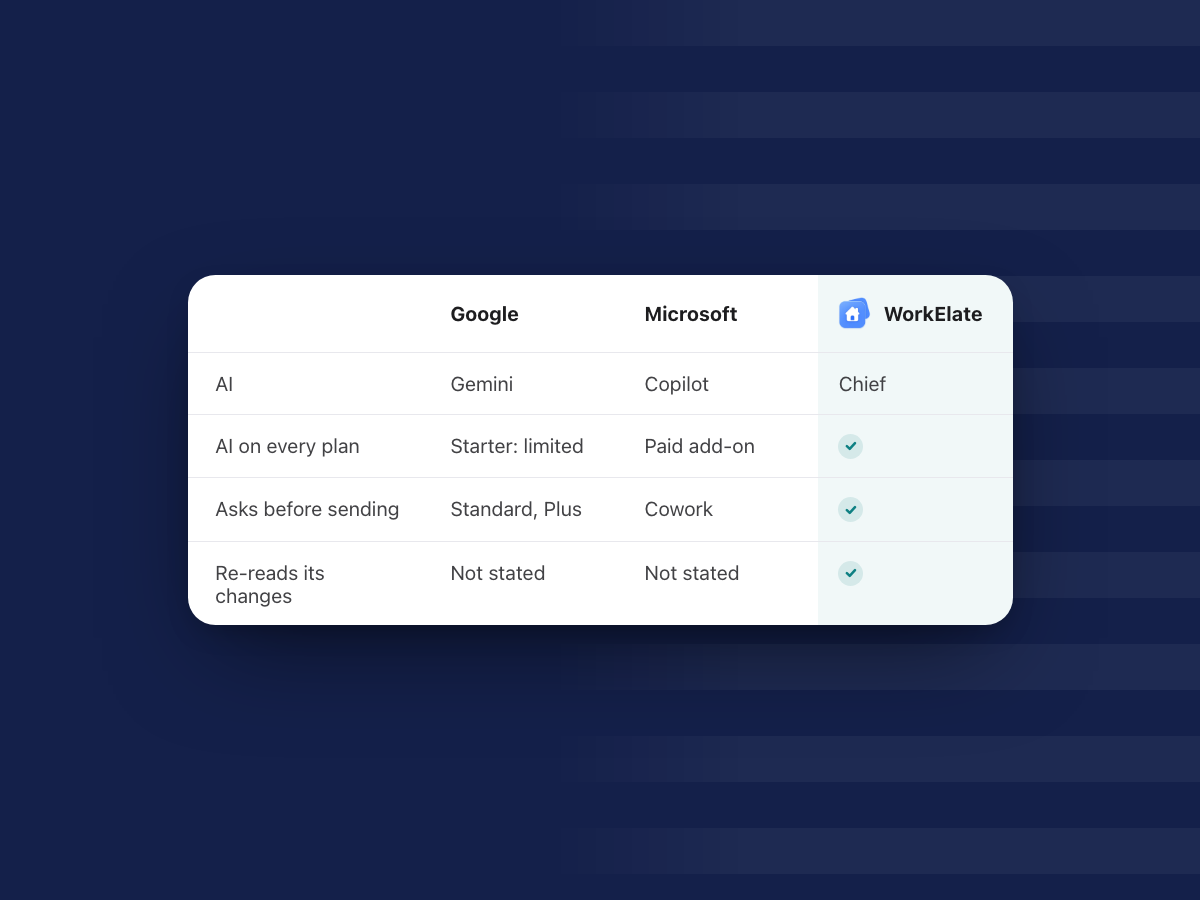
Pick Google Workspace if your team lives in the browser, wants Gemini in Docs and Gmail on the plan, and values simple admin. Pick Microsoft 365 if you need desktop Excel and Word, Teams, or deep compliance, and budget extra for the Copilot add-on.
If what you really want is one AI that does the work across every app, asks before anything goes out and comes on every plan, weigh a third option: an AI-native suite like WorkElate.
Google Workspace and Microsoft 365 cost the same per seat at the base tiers in 2026. Both cap business plans at 300 users, and both now sell an AI that can act, not just write. So the choice is harder than it was.
This guide is for the founder, ops or finance lead at a 10 to 200 person company making that call: apps, 2026 prices, Gemini against Copilot, admin, client files, a guide by role, and switching.
Every Google and Microsoft fact here comes from the vendor's own pages, as of October 2026, with links. Prices shown are US list prices in USD unless we say otherwise. They vary by region, so check the vendor's page for yours.
Which should you choose? The quick verdict
| Google Workspace + Gemini | Microsoft 365 + Copilot | AI-native suite (WorkElate + Chief) | |
|---|---|---|---|
| Best for | Browser-first teams that want AI on the plan | Desktop Office, Teams, regulated or IT-heavy teams | 10 to 200 person teams that want one AI doing the work across apps |
| Base price (annual, per user/month) | $7 / $14 / $22 | $7 / $14 / $22 (with Teams) | Quote-based, see pricing |
| AI on the plan | Gemini on every plan; in Docs, Sheets, Slides from Business Standard | Copilot Chat included; full Microsoft 365 Copilot is a paid add-on | Chief included on every plan, no add-on |
| AI that acts | Cross-app actions from a side panel (Standard and up), plus Studio flows you build | Copilot Cowork, with a Copilot license and usage-based billing | Chief acts in Docs, Sheets, Slides, Mail, Chat, Calendar, Tasks, Canvas, Forms and Journey |
| Asks before sending | Preview card for sends and meetings | Asks before important actions; "Always allow" can skip similar prompts | Nothing sends, shares or deletes without your yes |
| Checks its own work | Not described on the pages we read | You review the results | Re-reads every change and tells you every miss |
| Desktop and offline | Browser apps, offline in Chrome or Edge | Full desktop Word, Excel, PowerPoint on Standard and Premium | Not the focus today |
| Meetings | Meet | Teams | No video app. Keep Meet or Teams |
| Compliance depth | Vault and endpoint management on Business Plus | Purview, Copilot admin controls, AI Administrator role | Simpler; see security |
How do the everyday apps compare?
For daily work, both are good. The differences show up at the edges.
Docs vs Word. Google Docs is built for many people editing one file at once in a browser. Word is the stronger tool for long, tightly formatted documents, contracts with tracked changes and exact print layouts. On Microsoft, the full desktop Word, Excel and PowerPoint come with Business Standard and Premium. Business Basic is web and mobile only (Microsoft Learn: plan options).
Sheets vs Excel. For shared trackers, budgets and simple reporting, Sheets is easy and fast. For large models, macros, pivot-heavy reports and finance work, Excel is decades deep. Power BI is included only in E5 among Microsoft's listed suites. If your finance lead lives in desktop Excel, that one fact often decides the whole question.
Gmail vs Outlook. Both are mature. Microsoft lists a 100 GB mailbox on every Business plan, with an archive of 50 GB on Basic and Standard and up to 1.5 TB on Premium (Exchange Online limits). On Google, mail shares the pooled storage of your plan.
Meet vs Teams. Google lists Meet at up to 100 people on Business Starter, 150 on Standard and 500 on Plus, with recordings saved to Drive from Standard up (Google business editions). Teams combines meetings and chat, and many clients expect a Teams link.
Drive vs OneDrive and SharePoint. Google keeps it simple: Drive and shared drives. Microsoft splits it. OneDrive is for "an individual's personal work files," and for team or company files "SharePoint is the best solution" (OneDrive service description). That split is powerful but takes planning.
Offline and desktop. Google Docs, Sheets and Slides work offline in Chrome or Edge with the Docs Offline extension, and on phones you can mark files available offline (Docs Editors Help). Microsoft's desktop apps are offline by nature.
How much do Google Workspace and Microsoft 365 cost in 2026?
The base prices line up almost exactly, as of October 2026. The gap opens when you add AI.
| Tier (per user per month, annual) | Google Workspace | Microsoft 365 (with Teams) |
|---|---|---|
| Entry | Business Starter $7 | Business Basic $7 |
| Middle | Business Standard $14 | Business Standard $14 |
| Top business tier | Business Plus $22 | Business Premium $22 |
| User cap on business plans | Up to 300 | Up to 300 |
Google, in detail. Google offers two ways to pay. Annual (fixed-term) is $7, $14 and $22. Flexible is $8.40, $16.80 and $26.40, with no commitment, and you can add or remove users any time. On the annual plan you can only reduce licences at renewal, and if you cancel early you are charged for the rest of the term, with "no refunds" (Google billing help). Enterprise has no listed price; Google says "Let's talk" (Google pricing).
Microsoft, in detail. Microsoft raised prices on July 1, 2026. Business Basic went from $6.00 to $7.00 and Business Standard from $12.50 to $14.00. Business Premium stayed at $22.00. Versions without Teams are $5.40, $10.79 and $18.79. Existing customers keep their current price until renewal (Microsoft licensing news).
The AI line. Google includes Gemini in its plans. Microsoft includes Copilot Chat, but the full Microsoft 365 Copilot is a separate license. Copilot Business, the add-on for companies up to 300 users, lists at $21.00 per user per month on an annual plan. For offers between July 1 and December 31, 2026, it shows a promotional $18.00 for the first year only. Paid month to month it is $25.20 (Microsoft 365 Copilot plans).
India note. Google's pricing page shows different plans in India, in rupees and before tax: Base ₹99 (up to 20 users), Starter ₹270, Standard ₹1,080 and Enterprise on request, with introductory offers for new customers from November 10, 2026 (Google pricing, viewed from India). In India, the Base plan has the Gemini app but not Gemini in Gmail. We did not verify Microsoft's India prices for this guide, so check Microsoft's site for your region. If India pricing and local hosting matter most, also read our Zoho Workplace alternative guide.
A cost example (a scenario, not a quote)
Say you run a 30-person team on the middle tier, paid annually, and you want the AI most people picture: inside documents, sheets and mail.
| Per person, per month | 30 people, per year | |
|---|---|---|
| Google Business Standard (Gemini in Docs, Sheets, Slides, Gmail included) | $14.00 | $5,040 |
| Microsoft Business Standard, no Copilot add-on | $14.00 | $5,040 |
| Microsoft Business Standard + Copilot Business at list | $35.00 | $12,600 |
| Microsoft Business Standard + Copilot Business, first-year promo | $32.00 | $11,520 |
Without the add-on, both cost the same. With Copilot for everyone, Microsoft costs well over twice as much at list. And Microsoft's plan page adds: "Some AI experiences require usage-based billing and may result in charges based on usage, beyond your license fees." That covers Copilot Cowork, which we come to next.
Gemini vs Copilot: which AI does more in 2026?
Both AIs now do more than chat. They differ in what comes on the plan, what costs extra and how they handle actions.
What is included on each plan?
Gemini. Google says its plans "include access to the Gemini app, Gemini Notebook, and Gemini in Gmail, Docs, Meet, and more," depending on the subscription (Google Admin Help). On Business Starter you get the Gemini app and Gemini in Gmail, with other apps "Limited." Gemini in Docs, Sheets, Slides, Drive, Meet and Chat starts at Business Standard, and Google reserves its most capable models for Standard and Enterprise (Google pricing). Business Plus has the same Gemini as Standard.
Copilot. Copilot Chat is included with eligible Microsoft 365 plans. Microsoft says it "primarily uses web data," and to use your own work you must give it the content: paste it, upload a file, or use it in Outlook or Teams with that content open. Without the add-on you get "standard access" to Copilot in Word, Excel and PowerPoint, "subject to service capacity and might vary throughout the day" (Microsoft Learn: Copilot overview). In summer 2026 Microsoft added inbox and calendar awareness and access to Word, Excel and PowerPoint agents to Copilot Chat on Business plans (Microsoft licensing news).
With the paid Microsoft 365 Copilot license, Copilot reads your emails, files, meetings and calendars on its own and you get priority access. It also unlocks pre-built agents such as Researcher, Analyst and Facilitator, and agent building with Agent Builder and Copilot Studio (Microsoft 365 Copilot plans).
What does each AI do inside the apps?
Inside single apps, the two are close.
- Writing. Gemini writes formatted first drafts in Docs in your tone. Copilot drafts, rewrites and summarizes in Word.
- Spreadsheets. Gemini builds tables, formulas and charts in Sheets, and shows an "Action preview card" you approve with Apply before it changes your sheet (Docs Editors Help). Copilot analyzes data and creates formulas and visuals in Excel.
- Mail. Gemini summarizes threads, drafts replies, proposes meeting times, and can archive, delete, label and star mail "after you confirm" (Gmail Help). Copilot drafts emails, summarizes threads and offers coaching tips in Outlook.
- Meetings. Gemini's "Take notes for me" writes notes into a Google Doc and emails a recap (Meet Help). Copilot in Teams summarizes and transcribes meetings and captures action items.
If your team mostly wants help writing, either will do, and price matters more than features.
Where does each AI now act across apps?
Google. On 9 September 2026, Google announced actions across apps from the Gemini side panel. From Docs, Gemini can create a deck, run deep research, draft or send emails and log to-dos. From Gmail it can create a Doc or Sheet. In Chat, Ask Gemini can create documents and schedule meetings. For sending emails or scheduling meetings, "Gemini presents an interactive preview card, allowing users to review, edit, and confirm before execution." This is on Business Standard and Plus and Enterprise Standard and Plus, not Starter (Workspace Updates, 9 Sep 2026).
For longer jobs, Google has Workspace Studio: you describe a task in plain words and Gemini builds a flow, such as saving attachments to Drive and logging them in Sheets. You review each step, test it and turn it on (Workspace Studio Help). Studio is on all Business and Enterprise plans and connects to Asana, Jira, Mailchimp and Salesforce (Workspace Studio).
Microsoft. Microsoft's acting agent is Copilot Cowork. Microsoft says it "sends emails, schedules meetings, creates documents, posts in Teams, and manages your calendar," and "you approve each action before it happens." It can also edit Word, Excel and PowerPoint files, reorganize folders, run scheduled tasks and prepare a daily briefing. It is generally available for work and school accounts (Microsoft Learn: Cowork).
Before an important action, Cowork "pauses and asks for your go-ahead," and shows a risk indicator for medium and high risk ones. It also offers "Always allow," which skips future approval prompts for similar actions in the current conversation (Get started with Cowork).
The catch is access. Cowork needs a Microsoft 365 Copilot license, Cowork turned on, and usage-based billing turned on. It is billed in Copilot Credits, and the pricing page does not list a per-credit rate (Microsoft 365 Copilot plans).
What do neither Google's nor Microsoft's pages say?
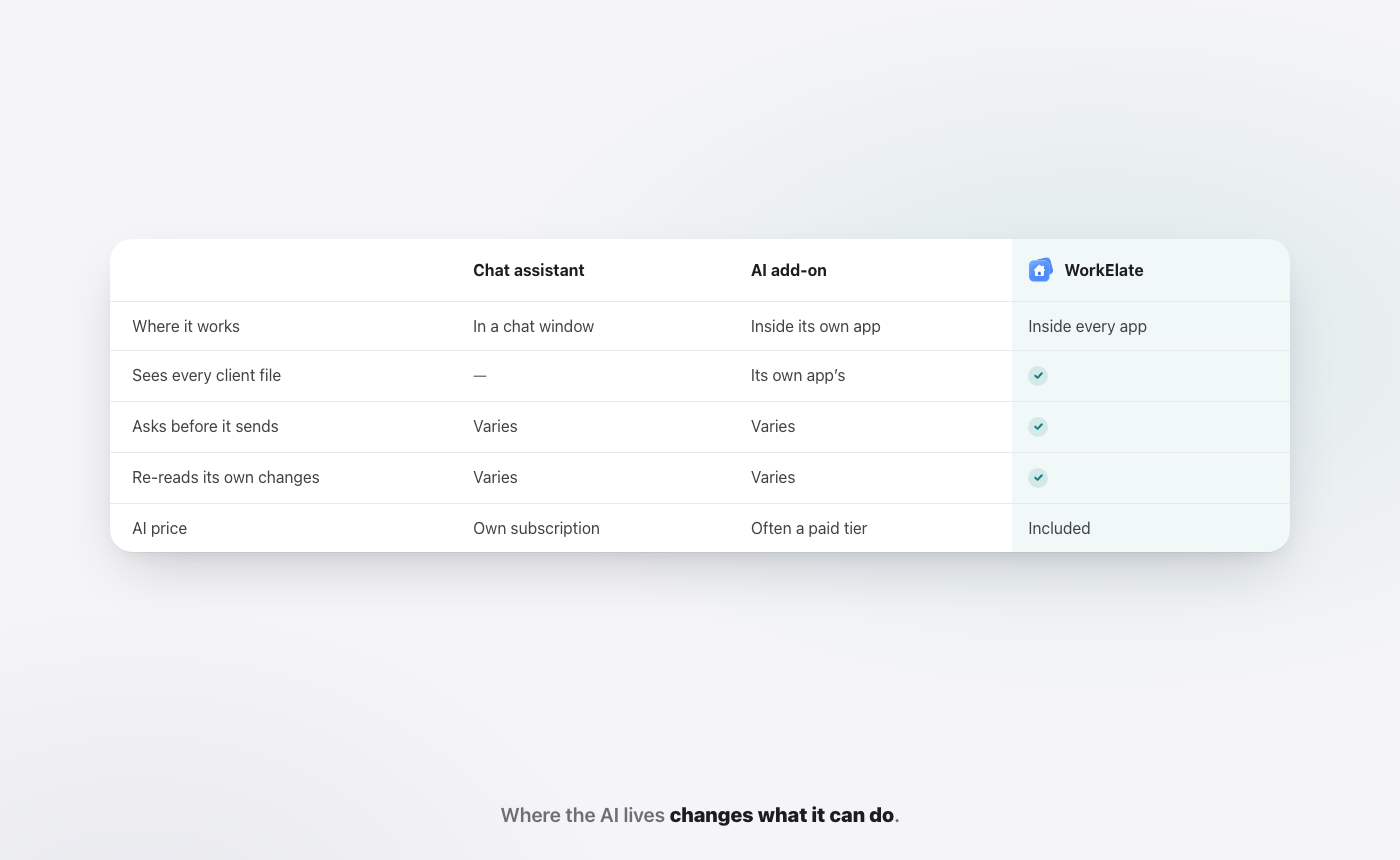
Neither vendor's pages describe the AI re-reading its own change after it acts.
Microsoft's own steps for Cowork end with: "Review the results ... check sent messages, or ask Cowork to make changes." The checking is yours. None of the Google pages we read describe Gemini checking a change after it makes one.
That may change, and it is easy to test: ask each AI to make a real change, then see whether it tells you, unprompted, if it worked. An AI that acts, fails quietly and says "done" costs you a deadline you did not know you missed. We go deeper on this in done, and checked.
What about your data?
Both vendors are clear here. Google says "Your data is your data, and it's not used to train Gemini models or for ads targeting," and that Gemini only retrieves content the user can already access (Google Workspace AI). Microsoft says Copilot access is "scoped by user permissions (security and compliance enforced)" (Microsoft Learn: Copilot overview).
How do storage, admin, security and compliance compare?
This is where Microsoft has traditionally led, and in 2026 it still has more depth. Google is simpler and often enough.
Storage. Google pools storage across the company: 30 GB per user on Starter, 2 TB on Standard and 5 TB on Plus. The full limit unlocks after a $30 payment on the subscription (Google business editions). Microsoft gives 1 TB of OneDrive per user on every Business plan, plus the 100 GB mailbox (OneDrive service description).
Google admin. Business Plus adds Vault, which Google describes as a way "to retain, search, and export your organization's data for eDiscovery and compliance needs," plus advanced endpoint management with stronger passwords and remote wipe (Google business editions). Google also lists data-loss controls for Gemini, and Studio will not override Drive data-loss rules.
Microsoft admin. Microsoft gives admins Copilot controls in the admin center, an AI Administrator role, Purview to label data and review prompts and responses, SharePoint Advanced Management to reduce oversharing, and EU Data Boundary handling (Microsoft Learn: Copilot overview).
The honest read. If an auditor or large client will inspect your IT, Microsoft's tools are deeper and more familiar. If you are a 40-person firm with a part-time IT person, Google's console is easier to run well.
How does each suite organise work by client or project?
Most teams of 10 to 200 people do not work by app. They work by client, project or deal. So the useful question is: where does everything about one client live, and can the AI see all of it?
Google. A Drive folder or shared drive holds any file type. Mail and chats stay outside the folder, though Google calls its cross-app context "Personalized context across every app" (Google Workspace).
Microsoft. The usual answer is a SharePoint site or a Teams team per client, since OneDrive is meant for personal files. That gives strong structure, but someone has to design and maintain it.
The one-folder-per-client idea. The idea is simple: every file about a client, of every type, sits in one folder, and the AI reads all of it. The brief, the budget sheet, the deck, the chat thread and the form answers, side by side. Ask "what changed for Acme this week?" and the answer draws on all of it, not on whichever app you happen to have open.
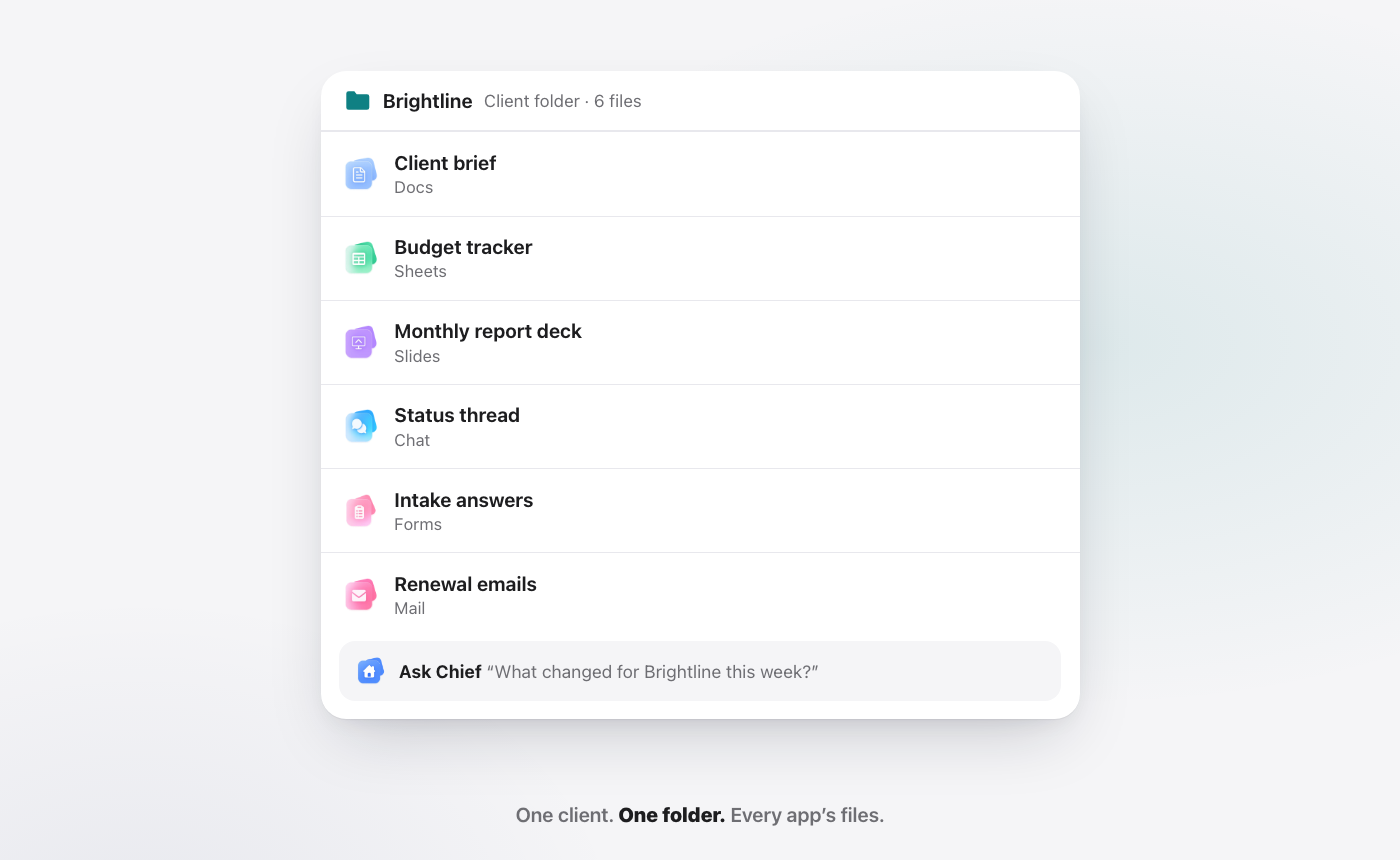
You can get close to this in both suites with discipline. In an AI-native suite it is the default. More in one client, one folder.
What is the third option: an AI-native suite?
An AI-native suite is an office suite built around one AI from the start, rather than an AI added to apps that already existed. The apps and the AI are one product, so there is nothing to connect, and the AI is part of every plan rather than a second license.
Where WorkElate fits. WorkElate is an AI-native office suite. Its AI, Chief, works across Docs, Sheets, Slides, Mail, Chat, Calendar, Tasks, Canvas, Forms and Journey, with Hub as home. It does the work in the app, not in a chat window beside it.
Take a plain Friday task: "Send Priya the Q3 numbers and move the Acme review to Friday." Chief reads the Q3 sheet, drafts the email in Mail with the numbers in it, finds the meeting in Calendar and proposes the new time. Then it stops and waits for your yes. One request, one place to approve, no flow to design first. That is the idea behind why AI should execute, not just assist.
What WorkElate promises, plainly:
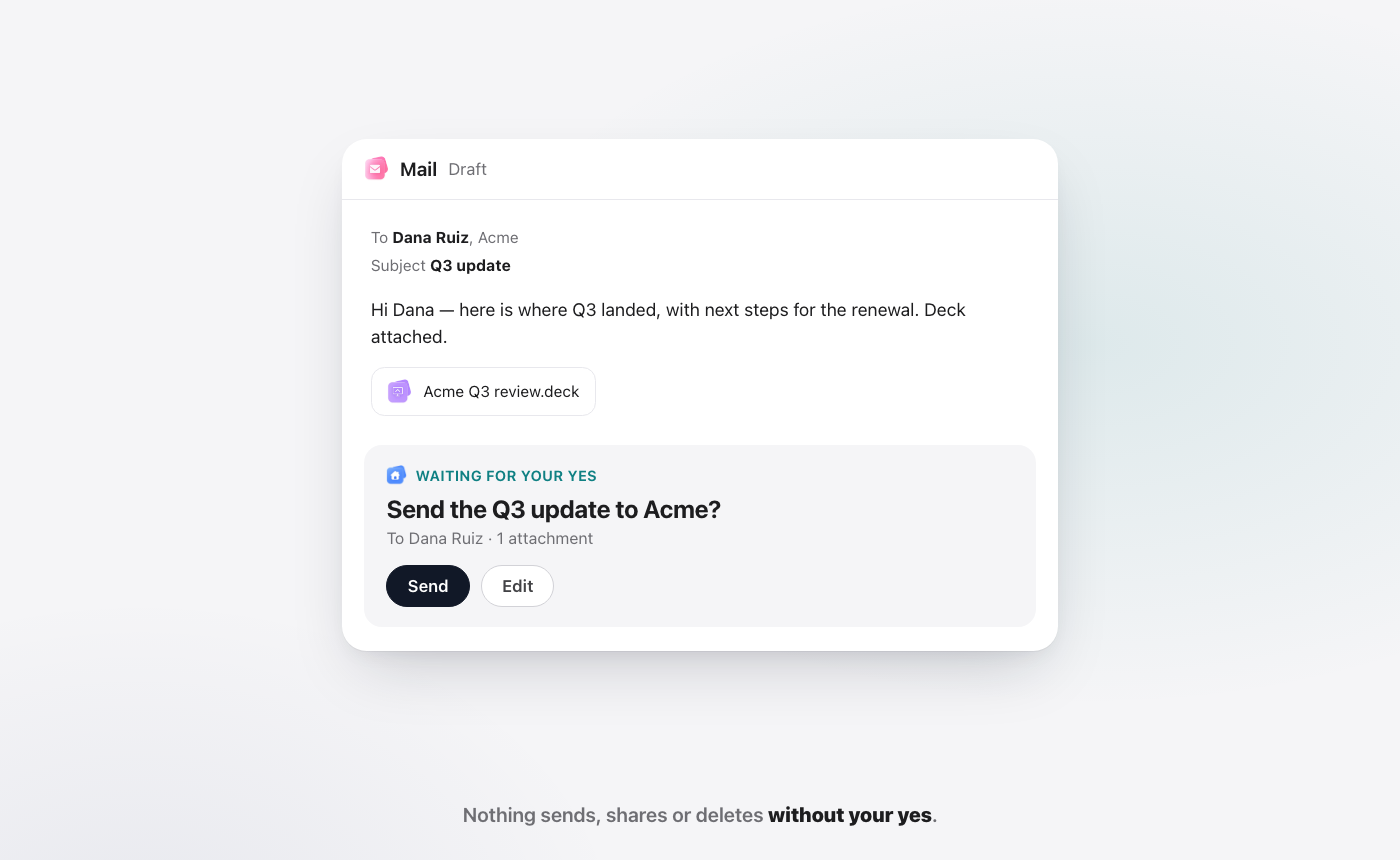
- It asks first. Nothing sends, shares or deletes without your yes, on every plan. A drafted email shows up as "Waiting for your yes" with Send and Edit.
- It checks its work. Chief re-reads every change it makes. If it moved a card, it checks the board. If something did not land, it tells you.
- Start my day. Each morning, Chief shows what needs you, what is slipping and what it handled, each with a "Because…" reason. More in why follow-ups exist at all.
- One folder per client, holding every app's files, read by Chief.
- AI included on every plan. No add-on. Pricing is quote-based; see pricing.
Where WorkElate is not the right pick.
- You live on video calls. WorkElate has no video-meeting app. Keep Meet or Teams.
- You need offline or desktop apps. Offline editing is not listed today, and there is no desktop Excel equivalent. Excel power users should stay on Microsoft.
- You are large. WorkElate fits teams of roughly 10 to 200 people best. At 300 seats and up, with years of admin policy, a big suite is the safer home.
- You need enterprise compliance. If you need eDiscovery, retention holds, device wipe or Purview-style controls for an audit, Google Business Plus or Microsoft are built for that.
- You run on integrations. If Studio flows into Salesforce or Jira, AppSheet apps or Copilot Studio agents are core to how you work, moving them is real effort.
Which suite fits your team? A guide by role
The answer depends less on size than on who does what all day. These are scenarios, not rules.
Founder-led firm, 10 to 40 people. The founder is the bottleneck: every follow-up, status note and client update waits on them. Google Business Standard gives good AI at a fair price; Microsoft fits if clients send Word and Excel files all day. If the pain is chasing rather than writing, an AI-native suite with Start my day targets it directly.
Ops-heavy team. Ops people move facts between apps: a form answer into a sheet, a sheet into a status email, a status into a task. Studio flows help if you design them ahead. Cowork helps if you pay for Copilot and metered use. One AI across every app, asking first, is the AI-native answer.
Sales team. Sales lives in mail, calendar and decks, often with a CRM next door. If your CRM is Salesforce, Google's Studio connector or Microsoft's ecosystem may tip it. If deals live in sheets and mail, an AI that drafts the follow-up and waits for a yes saves the most time.
Finance. If your models run in desktop Excel with macros, choose Microsoft and stop there. If finance mostly tracks invoices, budgets and approvals in shared sheets, Google or an AI-native suite works, and the cost of Copilot seats becomes the question.
Regulated teams. Anyone with an auditor: choose Microsoft or Google Business Plus. Vault, Purview, retention and device controls are the point.
Client-services teams of any kind. Studios, agencies, consultancies, and the account leads, finance and HR people around them. Here the one-folder-per-client model matters most, because every client's work is spread across docs, sheets, decks and mail. Say you run a 30-person studio like Brightline: your account lead asks Chief for the Acme status note and gets a draft from the budget sheet and open tasks, waiting for a yes.
How do you switch between them, and what are the traps?
Google to Microsoft, or Microsoft to Google
What moves. Mail, calendars and contacts move with migration tools. Google's data import tool copies email from another Workspace account, Exchange Online, IMAP or Gmail (Google Admin Help). Files move too, but Docs, Sheets and Slides convert to Word, Excel and PowerPoint formats and back, and complex formatting, macros or formulas may need checking.
What does not move cleanly. Automations: Studio flows, AppSheet apps, Copilot Studio agents and SharePoint structures have to be rebuilt. Re-check sharing after any file move.
How long. For a 10 to 200 person team, plan a few weeks for mail and calendar, plus extra time for file cleanup and training. Overlap briefly, and switch mail on a quiet day.
Contract traps to check first
- Google annual plans only let you reduce licences at renewal, and cancelling early means paying the rest of the term with no refunds. Google's Flexible plan avoids this but costs more per seat (Google billing help).
- Microsoft's July 2026 prices apply to existing customers at renewal, so your next renewal may be higher than your last (Microsoft licensing news).
- Copilot Business promo pricing needs an annual commitment and applies to the first year only. The one-month Copilot trial converts to paid automatically and needs a credit card (Microsoft 365 Copilot plans).
- Usage billing. If you turn on Cowork, set spend controls before people start using it.
Moving to an AI-native suite
You do not switch a company. You switch one client, then decide.
What moves. Only the live work for one client or one team: the brief you are still editing, the weekly budget sheet, the next deck, the open tasks. Put it in one WorkElate folder. Leave the archive where it is.
What stays. Your domain email for everyone else, Meet or Teams for calls, and desktop Excel for the finance models. Nothing about a pilot forces you to cancel a Google or Microsoft seat.
How long. About a month. Week one, pick a client and two or three people. Weeks two and three, use Chief for real tasks and open Start my day each morning. Week four, compare: less chasing, faster yeses, and did Chief flag what did not land? Start a couple of months before renewal.
For step-by-step versions, read our Google Workspace alternative and Microsoft 365 Copilot alternative guides. For the short side-by-side tables, see WorkElate vs Google Workspace and WorkElate vs Microsoft 365.
FAQ
Is Google Workspace or Microsoft 365 better for a small business?
For a browser-first team that wants AI on the plan, Google Workspace is usually the better value, because Gemini in Docs, Sheets and Gmail is included from Business Standard at $14 per user per month on an annual plan, as of October 2026. Microsoft 365 is better if you need desktop Excel and Word, Teams, or deeper compliance tools.
Is Google Workspace cheaper than Microsoft 365?
At the base tiers, no: both list $7, $14 and $22 per user per month on annual plans in the US, as of October 2026. The difference is AI. Google includes Gemini in the plan, while the full Microsoft 365 Copilot is an add-on listing at $21.00 per user per month for Copilot Business, with a first-year promo of $18.00 for offers through December 31, 2026.
Is Copilot included in Microsoft 365?
Copilot Chat is included with eligible Microsoft 365 plans and mainly uses web data unless you give it your files. The full Microsoft 365 Copilot, grounded in your emails, files and meetings, is a separate per-user license. Copilot Cowork, the agent that acts, also needs usage-based billing (Microsoft).
Is Gemini included in every Google Workspace plan?
Yes, by tier. Business Starter includes the Gemini app and Gemini in Gmail, with other apps "Limited." Gemini in Docs, Sheets, Slides, Drive and Meet, and the September 2026 cross-app actions, start at Business Standard (Google).
Does Gemini or Copilot ask before sending an email?
Both now do for key actions. Gemini shows a preview card to review, edit and confirm before it sends an email or schedules a meeting, on Business Standard and up. Copilot Cowork pauses for your go-ahead before important actions, though "Always allow" can skip similar prompts in a conversation. In WorkElate, nothing sends, shares or deletes without your yes.
Does either AI check its own work?
Neither vendor's pages describe it. Microsoft's Cowork steps end with you reviewing the results, and none of the Google pages we read describe Gemini re-reading a change after making it. WorkElate's Chief re-reads every change it makes and tells you when one did not land.
What is an AI-native office suite?
An AI-native office suite is a set of office apps built around one AI from the start, so the AI acts across every app, with nothing to connect and no separate AI license. WorkElate is one: Chief works across Docs, Sheets, Slides, Mail, Chat, Calendar, Tasks, Canvas, Forms and Journey, and is included on every plan.
Start free and run your next client in one folder, with Chief doing the carrying.


