Google Workspace Alternative: Should Your Team Switch?
In short
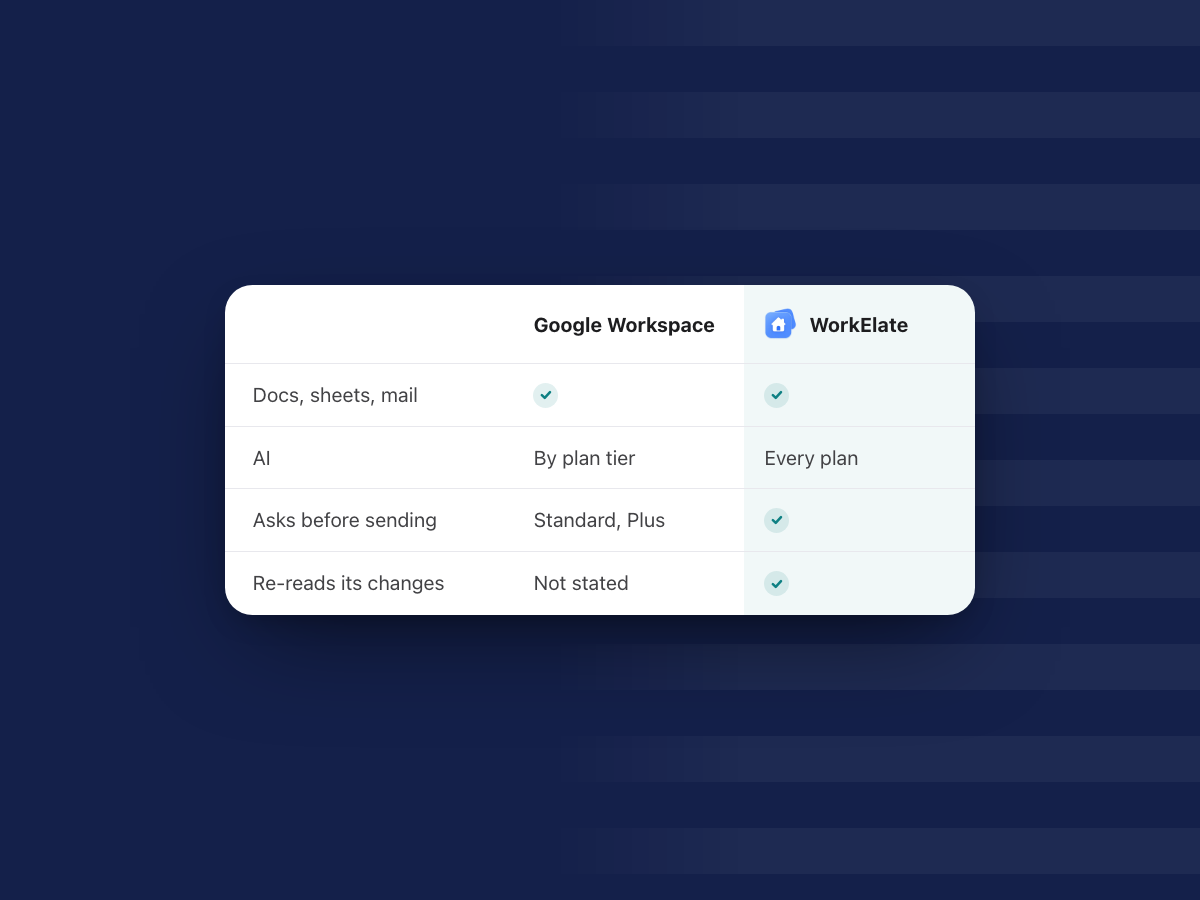
Google Workspace is the safer pick for scale, meetings, offline work and compliance. WorkElate fits when you want one AI that does the work across every app, asks first, re-reads each change, and comes on every plan.
You do not have to switch all at once: run one client in WorkElate for a month while Google keeps running.
Most teams looking for a Google Workspace alternative like Gmail fine. What wears them down is carrying facts between apps. So the real question: an assistant inside each app, or one AI doing the work across all of them?
What does Google Workspace do better than any alternative?
This is a fair look at that choice for a team of 10 to 200 people. Every Google fact here comes from Google's own pages, as of October 2026, with links. Prices vary by region, so check Google's page for yours.
Start with the honest part. Google is very good at the things that made it the default.
Scale and reliability. Google says you can "join millions of businesses that run on premium versions of Gmail, Calendar" and the rest of the suite (Google Workspace). Your clients already use it. Their invites, shared Docs and Drive links just work.
Meet. Video meetings are built in, up to 100 people on Business Starter, 150 on Business Standard and 500 on Business Plus (Google business editions). From Business Standard, recordings save to Drive, and "Take notes for me" writes meeting notes into a Google Doc and emails the organizer a recap (Meet Help). WorkElate has no video-meeting app in its suite. If your day runs on calls, keep Meet.
Offline. Docs, Sheets and Slides work offline in Chrome or Edge, and on phones you can mark files "available offline" (Docs Editors Help). For people who travel or work on patchy connections, that matters.
Admin and compliance depth. Business Plus adds Vault "to retain, search, and export your organization's data for eDiscovery and compliance needs," plus advanced endpoint management with remote wipe (Google business editions). Google also lists data-loss controls and certifications such as ISO 42001 and SOC 1/2/3 for Gemini (Google Workspace AI).
Ecosystem. AppSheet Core, for building apps without code, comes from Business Starter up. Workspace Studio connects to Asana, Jira, Mailchimp and Salesforce (Workspace Studio). If your work leans on those links, Google has more of them.
If any of these is the deciding factor for your team, Google is the better choice, and that is fine.
What can Gemini do in Google Workspace in 2026?
More than a year ago, and it is worth being precise.
In Gmail, Gemini summarizes threads, drafts and refines replies, finds details, proposes meeting times and creates calendar events. It can also archive, delete, label and star mail after you confirm (Gmail Help).
In Docs it writes formatted first drafts in your tone. In Slides it adds editable slides to a deck. In Drive it searches and summarizes across files. In Meet it takes notes (Google Workspace AI).
In Sheets it builds tables, formulas and charts. When you ask it to change your sheet, it shows an "Action preview card" and waits for you to click Apply (Docs Editors Help).
In September 2026 Google added actions across apps. From the Docs side panel, Gemini can create a deck, run deep research, draft or send emails and log to-dos. From Gmail it can create a Doc or Sheet. For sending emails or scheduling meetings, "Gemini presents an interactive preview card, allowing users to review, edit, and confirm before execution." This is on Business Standard and Plus, not Starter (Workspace Updates, 9 Sep 2026).
Then there is Workspace Studio: you describe a task in plain words and Gemini builds a flow, such as saving attachments to Drive and logging them in Sheets. You review each step, test it, then turn it on (Workspace Studio Help).
So Gemini is not only a chat box anymore. That makes the real differences smaller, and easier to see.
Is Gemini included in every Google Workspace plan?
It is included, but how much you get depends on the tier. As of October 2026, Google's US list prices per user per month are (Google billing help):
- Business Starter: $7 on an annual plan, $8.40 on the Flexible plan. Gemini in Gmail and the Gemini app. Gemini in other apps is "Limited" (Google pricing).
- Business Standard: $14 annual, $16.80 Flexible. Gemini in Gmail, Docs, Sheets, Slides, Drive, Meet and Chat, plus the cross-app actions above.
- Business Plus: $22 annual, $26.40 Flexible. Everything in Standard, plus Vault and more storage.
Storage is pooled: 30 GB per user on Starter, 2 TB on Standard and 5 TB on Plus. Annual plans can only drop licences at renewal, and leaving early means paying the rest of the contract (Google billing help).
In practice, the Gemini most people picture, the one inside Docs and Sheets that acts across apps, starts at Standard. For a 40-person team that is a real line in the budget.
WorkElate's answer is simpler. AI is included on every plan, with no add-on. Chief comes with every plan. See pricing for the plans themselves.
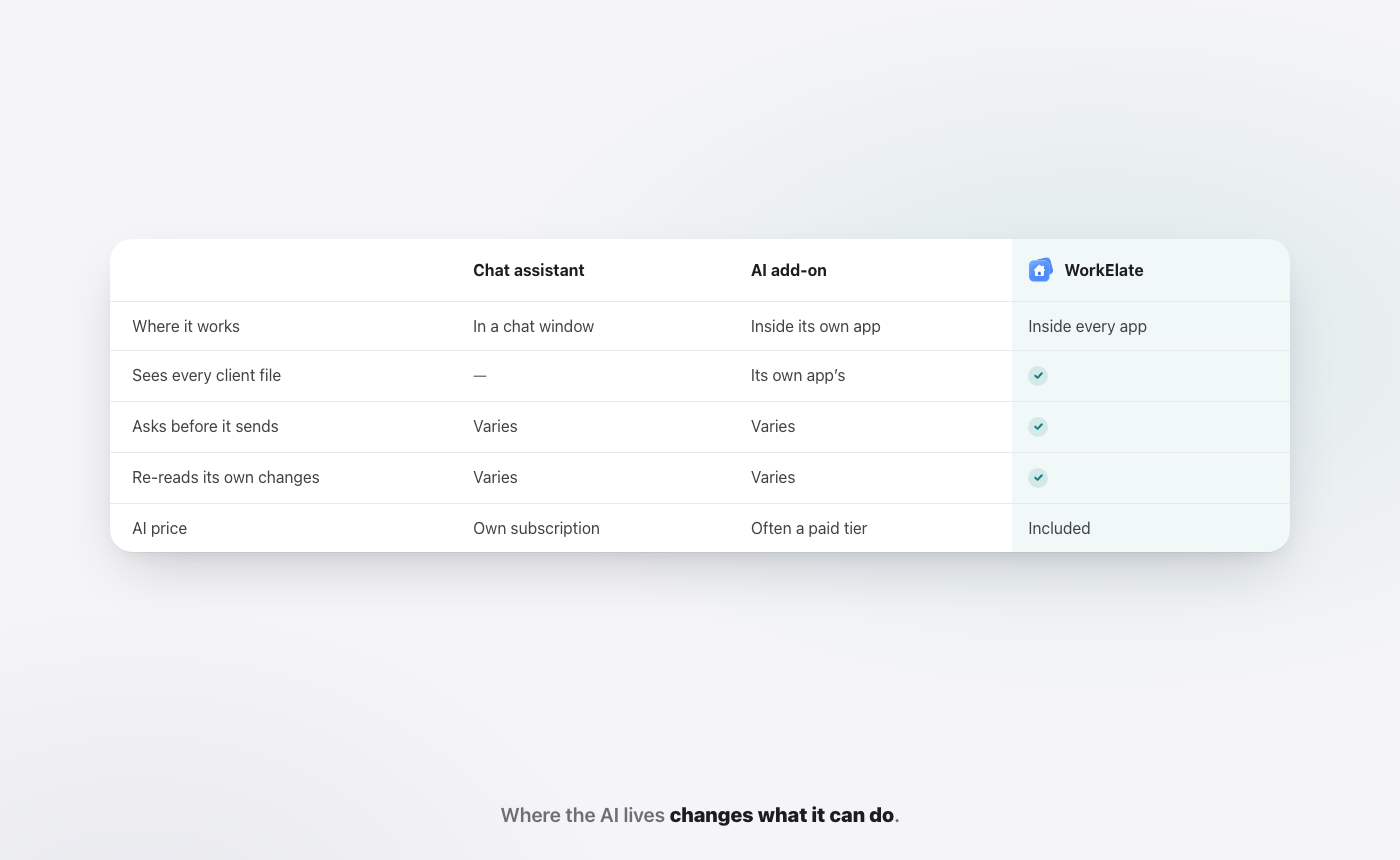
How is an AI in each app different from one AI across all apps?
Gemini lives in a side panel in each app. Each panel can now reach a few other apps: Docs can draft an email, Gmail can create a sheet. For anything longer, you build a Studio flow ahead of time.
Chief, the AI inside WorkElate, works differently. It is one AI across Docs, Sheets, Slides, Mail, Chat, Calendar, Tasks, Canvas, Forms and Journey, with Hub as home. There is nothing to connect, because the apps and Chief are one suite.
Take a plain Friday task: "Send Priya the Q3 numbers and move the Acme review to Friday." Chief reads the Q3 sheet, drafts the email in Mail with the numbers in it, finds the meeting in Calendar and proposes the new time. Then it stops and waits for your yes.
You can do parts of that with Gemini on Standard. The difference is that with Chief it is one request, one place to say yes, and no flow to design first. It is the idea behind why AI should execute, not just assist: you stop being the clipboard between apps.
Does the AI ask before it sends, and does it check its work?
Both suites now ask before some actions. Google's preview card covers sending email and scheduling meetings on Standard and up, and Sheets edits wait for Apply. That is a good step, and it is fair to say so.
In WorkElate, the rule is wider and the same on every plan: nothing sends, shares or deletes without your yes. A drafted email shows up as "Waiting for your yes" with Send and Edit. A file share waits. A delete waits.
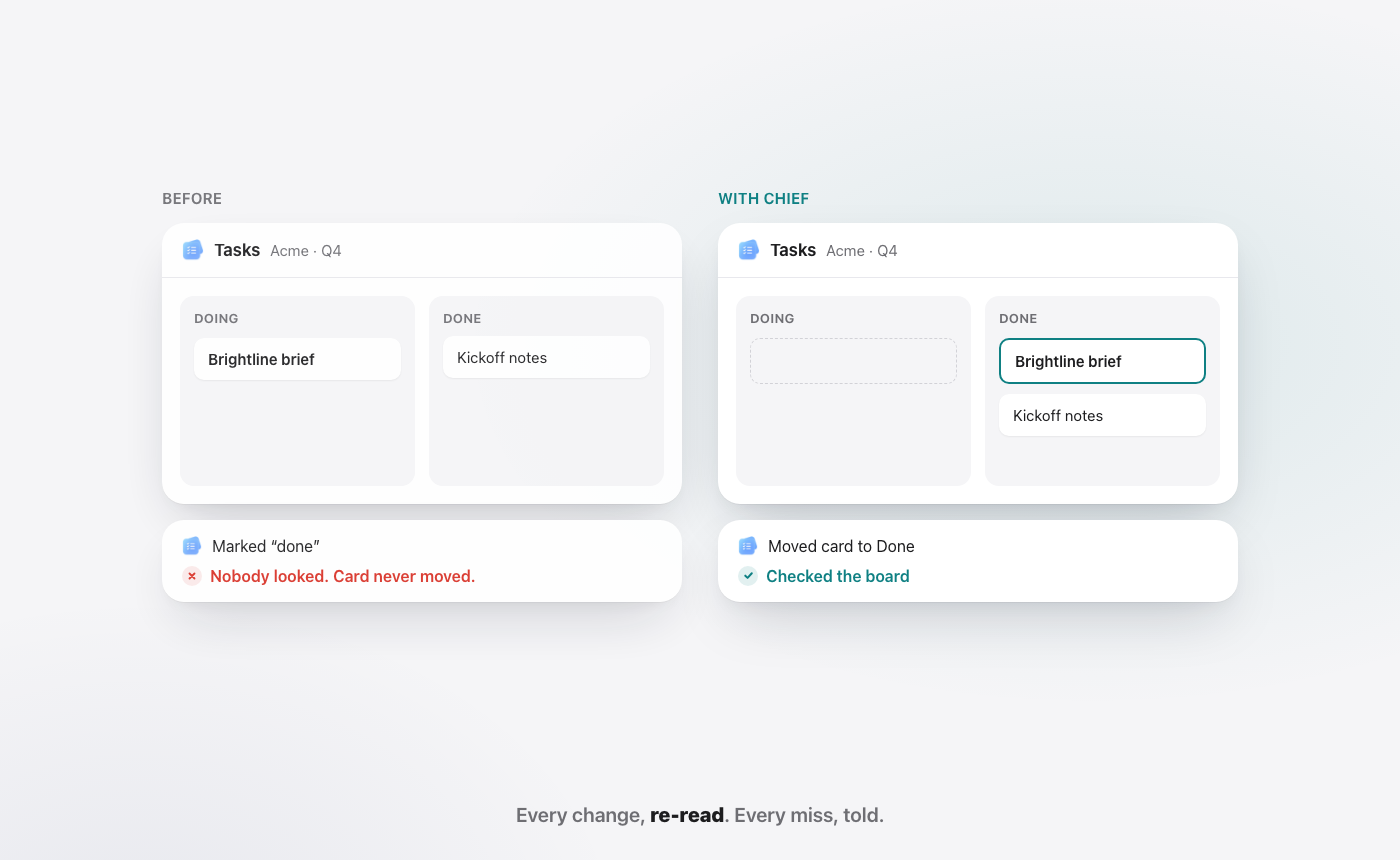
The second habit is where the suites part ways. After Chief makes a change, it re-reads the result.
If it moved a card, it looks at the board. If it wrote a row, it reads the row back. If something did not land, it tells you in plain words.
Every change, re-read. Every miss, told.
None of the Google pages we read describe Gemini re-reading its own change after acting. Gemini may improve here. Today, it is a difference you can test: ask both to make a change, then check whether either one tells you if it worked.
Why it matters: an AI that drafts a weak summary costs you two minutes. An AI that acts, fails quietly and says "done" costs you a missed deadline you did not know about. We go deeper on this in done, and checked.
Drive folders or one folder per client: which works better?
Google Drive folders can hold any file type, and many teams already keep a folder per client. That works. The gap is what the AI can do with that folder.
In WorkElate, one folder per client holds every app's files: the brief in Docs, the budget in Sheets, the deck in Slides, the Chat thread and the Forms answers, side by side. And Chief reads all of it. Ask "what changed for Acme this week?" and the answer draws on every file in the client's folder, not on whichever app you happen to be in.
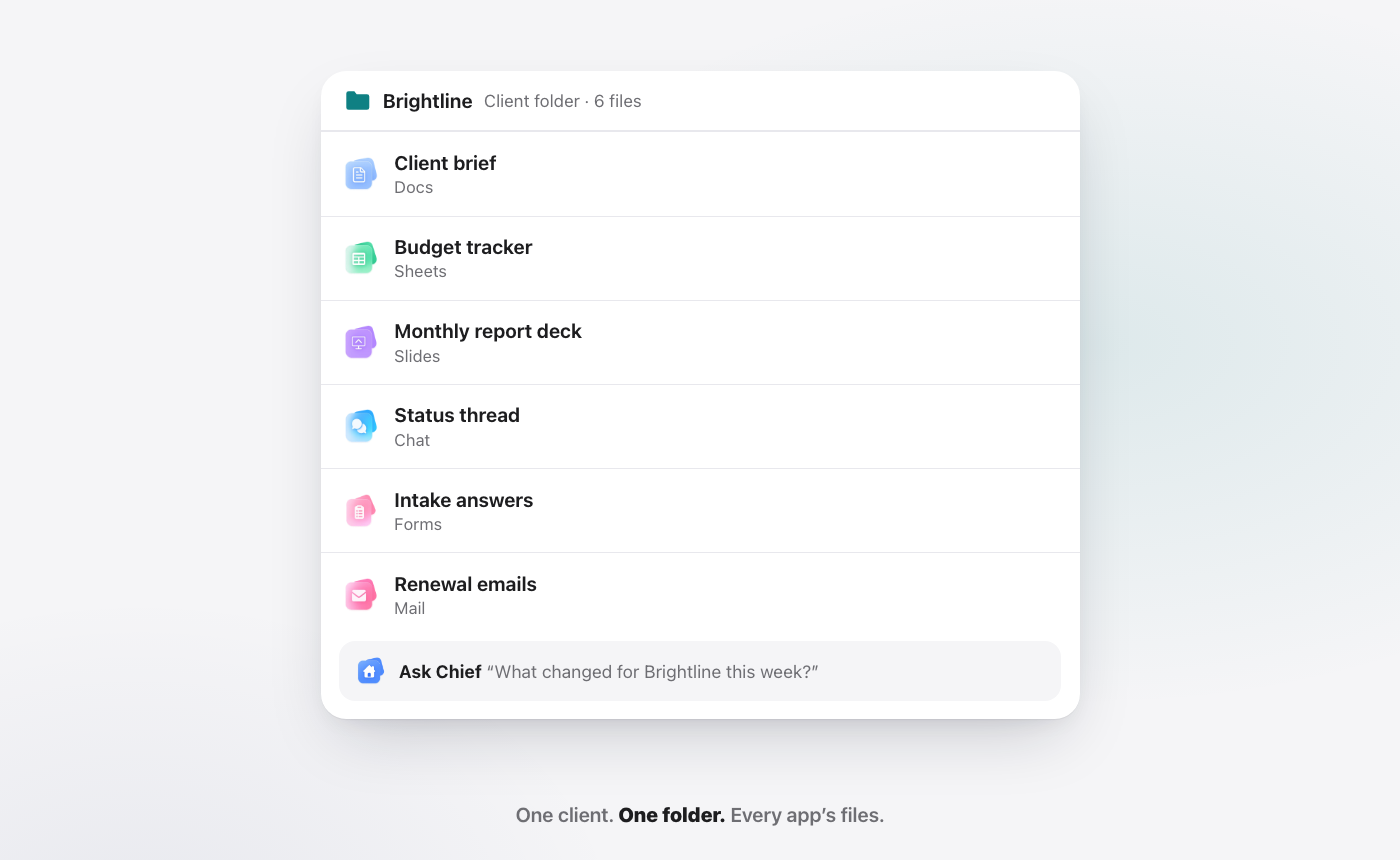
Say you run a 30-person studio like Brightline. Your account lead opens the Acme folder on Monday and asks Chief for a status note. Chief pulls the latest numbers from the budget sheet and the open items from Tasks, drafts the note, and waits for a yes. Nobody copied anything.
The same habit helps across the team. Finance opens a folder and sees the invoice sheet next to the client thread. HR keeps each hire's offer, forms and notes together. More on the model in one client, one folder.
Google Workspace vs WorkElate: how do they compare?
| Google Workspace + Gemini (as of Oct 2026) | WorkElate + Chief | |
|---|---|---|
| Price | $7 / $14 / $22 per user per month, annual (source) | See pricing |
| AI on the plan | Starter: Gemini in Gmail. Docs, Sheets, Slides, Meet from Standard | Chief on every plan, no add-on |
| AI across apps | Side-panel actions on Standard and up, plus Studio flows you build | One Chief across every app, nothing to connect |
| Asks before sending | Preview card for sends and meetings on Standard and up | Nothing sends, shares or deletes without your yes |
| Checks its own work | Not described on the pages we read | Re-reads every change, tells you every miss |
| Client work | Drive folders hold any file | One folder per client, every app's files, read by Chief |
| Morning view | Not described on the pages we read | Start my day: Needs you, Slipping, Handled, each with a reason |
| Video meetings | Meet, up to 100 / 150 / 500 people | Not in the suite. Keep Meet |
| Offline | Docs, Sheets, Slides offline | Not listed today. Check before you switch |
| Compliance | Vault and endpoint management on Plus | See security |
The table makes the trade plain. Google leads on breadth, meetings, offline and compliance. WorkElate leads on one AI that acts across the work, on every plan, and checks itself.
For the full three-way picture with Microsoft, read the Google Workspace vs Microsoft 365 guide. For the short side-by-side, see WorkElate vs Google Workspace.
How do you switch from Google Workspace without breaking anything?
You do not switch a company. You switch one client, then decide.
What moves. Only the live work for one client: the brief you are still editing, the budget sheet you update each week, the next deck, the open tasks. Rebuild or bring those into one WorkElate folder. Leave the archive where it is. Old files you rarely open do not need to move to test anything.
What stays. Gmail for everyone else, at least at first, plus Meet for calls and Drive for the archive. Keep any Studio flows or AppSheet apps your team depends on. Nothing in a pilot forces you to cancel Google.
How long. A sensible plan is about a month:
- Week 1. Pick one active client and two or three people who work on it. Set up their folder. Start doing the new work there.
- Weeks 2 and 3. Use Chief for the real tasks: status notes, follow-ups, sheet updates, the Monday plan. Open Start my day each morning and see whether Needs you, Slipping and Handled match what you would have chased by hand.
- Week 4. Compare. Did the client work take less carrying between apps? Did you trust the drafts enough to say yes faster? Did Chief tell you when something did not land?
Can you run both? Yes, and you should during a pilot. Your clients do not see the difference. Your Google plan keeps running. If you are on a Google annual plan, remember you can only drop licences at renewal, so time any reduction to your renewal date.
The honest test is not whether WorkElate can do everything Google does. It cannot, and the table says where. The test is whether one AI doing the work for your client teams is worth more to you than the extras you would use less of.
When is a Google Workspace alternative the wrong move?
Some teams should stay, and we would rather say so now.
Teams that live on video calls. If Meet recordings, notes and large meetings run your week, Google is the stronger home. WorkElate has no video-meeting app.
Teams that need offline work. If people edit files on flights or in places with weak internet, Google's offline Docs, Sheets and Slides matter more than anything else here.
Regulated teams. If you need eDiscovery, retention holds or device wipe for an audit, Business Plus and Vault are built for that.
Teams built on integrations. If Studio flows into Salesforce or Jira, or AppSheet apps, are part of how you work, moving them is real effort with little payoff.
Teams happy with Gemini on Standard. If your people already get what they need from the side panel and preview cards, the case for switching is smaller. Try Chief on one client first, or not at all.
Large companies with deep IT setup. WorkElate fits teams of roughly 10 to 200 people best. Above that, years of Google admin policy are hard to replace.
Who tends to get the most out of the switch? Teams where most of the day is client work spread across docs, sheets, decks and mail: studios, agencies, consultancies, and the ops, finance, sales and HR people around them. For them, one folder per client and one Chief that acts and checks itself saves the carrying, every day.
FAQ
What is the best Google Workspace alternative for a small team?
It depends on what you want to change. If you want the same kind of suite with a different vendor, look at Microsoft 365 or Zoho Workplace. If you want an AI that does the work across your apps, asks before anything goes out and is included on every plan, an AI-native suite like WorkElate is the alternative to test, one client at a time.
Is Gemini included in Google Workspace?
Yes, but by tier. As of October 2026, Business Starter includes Gemini in Gmail and the Gemini app, with other apps "Limited." Gemini in Docs, Sheets, Slides, Drive and Meet starts at Business Standard, $14 per user per month on an annual plan in the US (Google pricing).
Does Gemini ask before sending an email?
For some actions, yes. Google's September 2026 update says that for sending emails or scheduling meetings, Gemini shows a preview card to review, edit and confirm, on Business Standard and Plus. In WorkElate, nothing sends, shares or deletes without your yes, on every plan.
Can I use WorkElate and Google Workspace at the same time?
Yes. The easiest way to evaluate is to run one active client in WorkElate for about a month while Gmail, Meet and Drive keep running for everything else. Your clients see no change. At the end of the month, decide with your own work as the evidence, not a feature list.
What do I lose if I leave Google Workspace?
Meet, offline editing, Vault and Google's wider set of integrations are the main things WorkElate does not replace today. Weigh those against one AI across every app, one folder per client and AI on every plan.
Start free and run your next client in one folder, with Chief doing the carrying.


