Why Follow-Ups Exist at All: Start My Day, and Chase Less
In short
Follow-ups exist because the state of your work lives in your head, not in front of you.
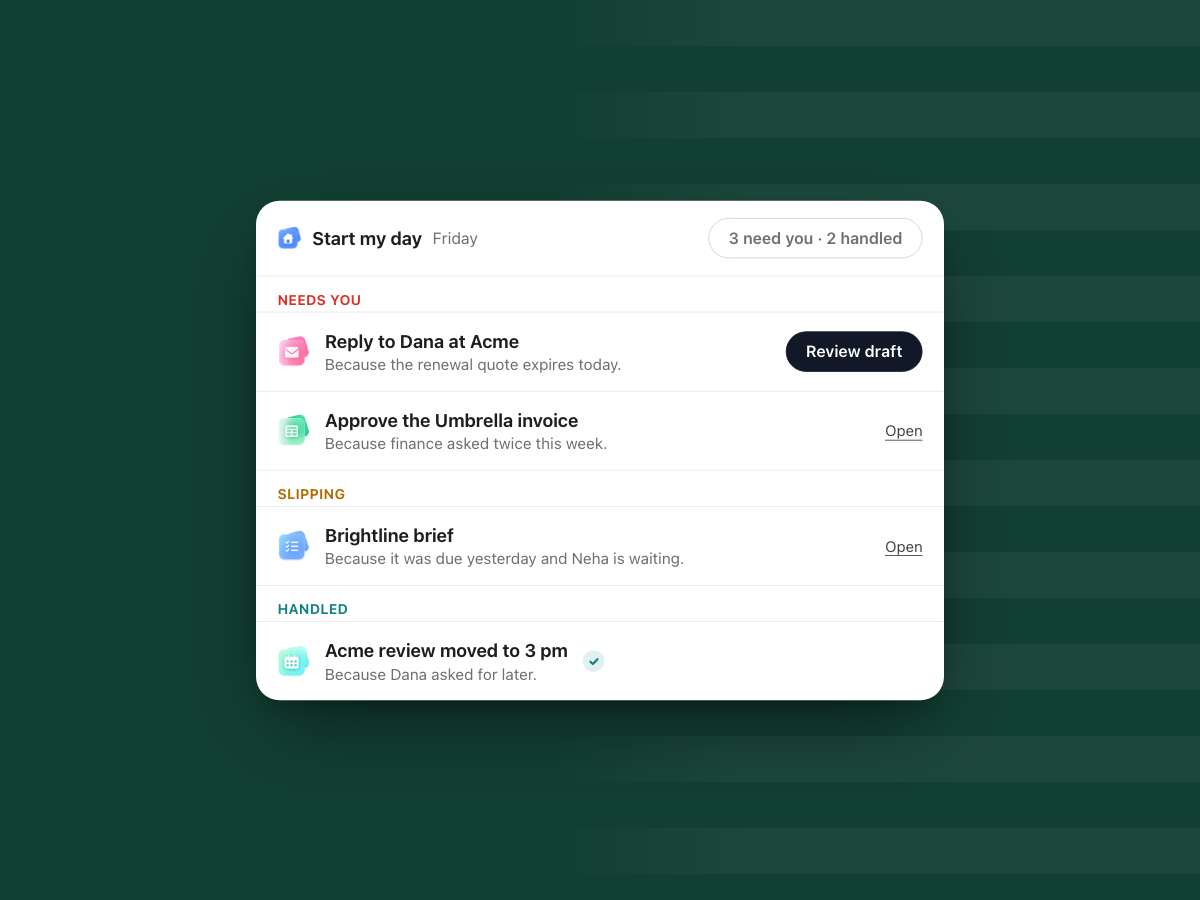
Start my day in WorkElate shows what needs you, what is slipping and what is handled, each with a "Because…" reason, so you chase less.
"Just circling back on this."
You have written that line more times than you can count. Maybe today. It is polite and harmless. It is also a small admission: the thing that was supposed to carry this work forgot to, so a person had to remember and chase it.
That is all a follow-up is. Not a virtue, not good hygiene. A patch for the moment nothing else is keeping the work moving.
Why do follow-ups exist in the first place?
Follow-ups exist because nobody can see, at a glance, which pieces of work are waiting on whom. The answer is usually somewhere. The client's reply is in the inbox. The due date is on the task. The quote's expiry is in the doc. But the pieces live in different places, and the only thing joining them is your memory.
So every morning you rebuild the picture by hand. You scan the inbox, open the task board, check the calendar, and try to remember what Neha was waiting on. Then you send the nudges. "Any update?" "Bumping this." "Did you get a chance to look?"
We have turned this into a skill. The organised operator is the one with the best follow-up game. But look at what the skill really is: a person holding the state of the work in their head because nothing in front of them shows it.
What does a follow-up really cost?
The thirty seconds it takes to type "any update?" is not the cost. The cost is that you became the reminder system. Your attention is now holding the work together, which means work moves only as fast as you can remember to push it.
It costs the other person too. Every nudge interrupts someone, and every interruption is a small context switch. Multiply that across a team and a lot of the week goes to chasing rather than doing. That is the hidden cost of a task: the work around the work.
The numbers point the same way. In Microsoft's 2023 Work Trend Index survey of 31,000 workers, the average employee spent 57% of their time communicating, in meetings, email and chat, and 68% said they do not have enough uninterrupted focus time in the workday (Microsoft WorkLab, "Will AI Fix Work?"). Not all of that is chasing. But chasing is the part nobody chose.
And it costs trust. When people get chased often, they start to feel watched. When the person chasing forgets, things slip quietly, and nobody notices until a client does.
What would need fewer follow-ups?
A better reminder app is not the answer. A reminder still assumes you remembered to set it.
What helps is a single view that answers three questions before you start: What needs me today? What is slipping? What already got done? And for each item, why. "Reply to Dana" is a task. "Reply to Dana, because the renewal quote expires today" is a priority.
The reason matters more than it looks. Without it, you get a list. With it, you can decide in seconds what to do first and what can wait. You stop asking around to find out why something is on your plate.
What is Start my day in WorkElate?
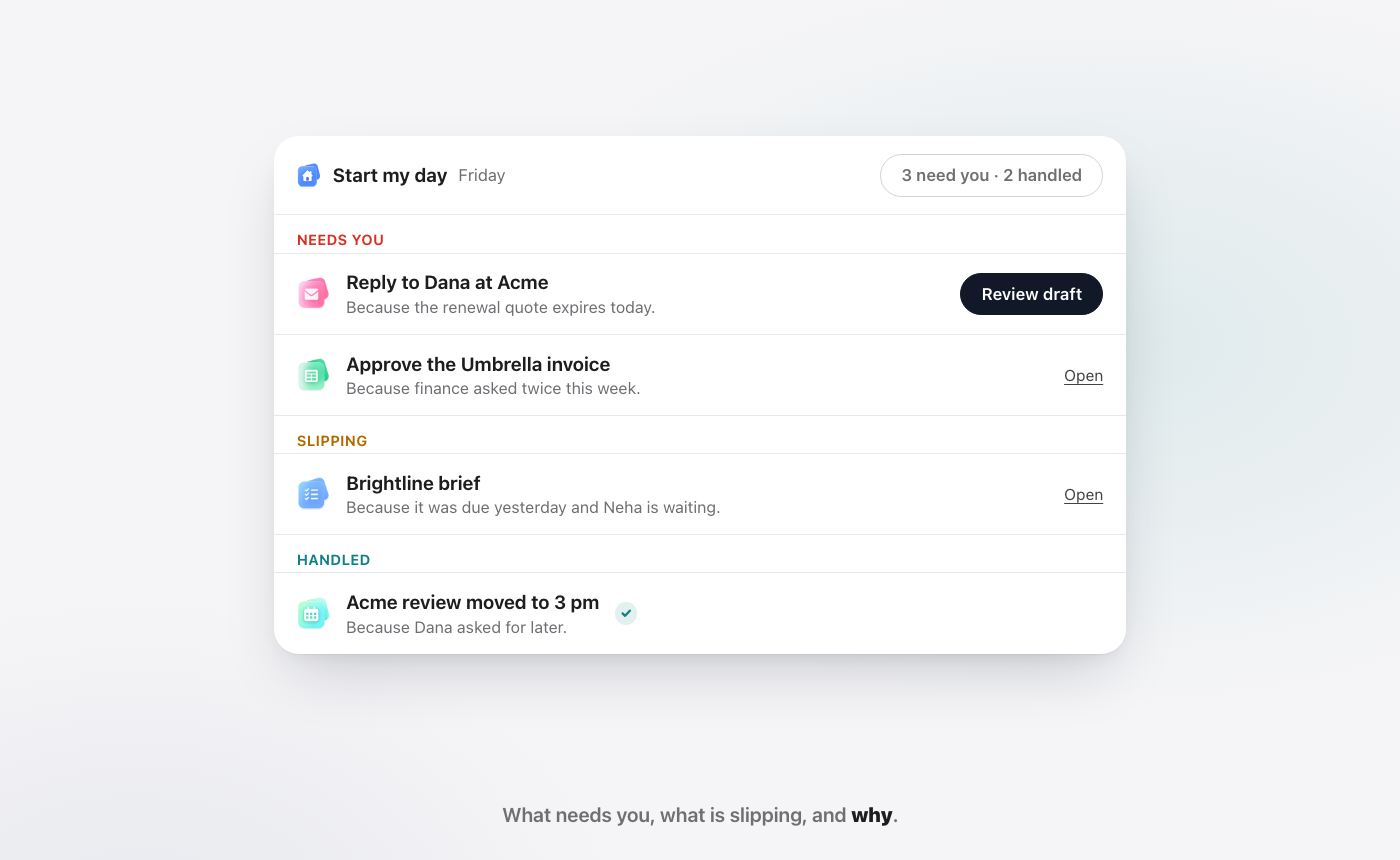
Start my day is where Chief, the AI in WorkElate, sorts your day when you open it. It reads across your Mail, Tasks, Calendar, Docs and the rest of the suite, then sorts what it finds into three groups, each item with a "Because…" line.
Needs you. The things only you can move. "Reply to Dana at Acme. Because the renewal quote expires today." "Approve the Umbrella invoice. Because finance asked twice this week." Each comes with a button to act on it: review the draft, or open it.
Slipping. Work that is late or about to be, and who it affects. "Brightline brief. Because it was due yesterday and Neha is waiting." This is the item you would otherwise discover through a follow-up, or worse, through someone else's follow-up to you.
Handled. What already got done, and why it happened. "Acme review moved to 3 pm. Because Dana asked for later." "Q3 numbers sent to Priya. Because you said yes at 9:10." You see the work that is off your plate without having to check.
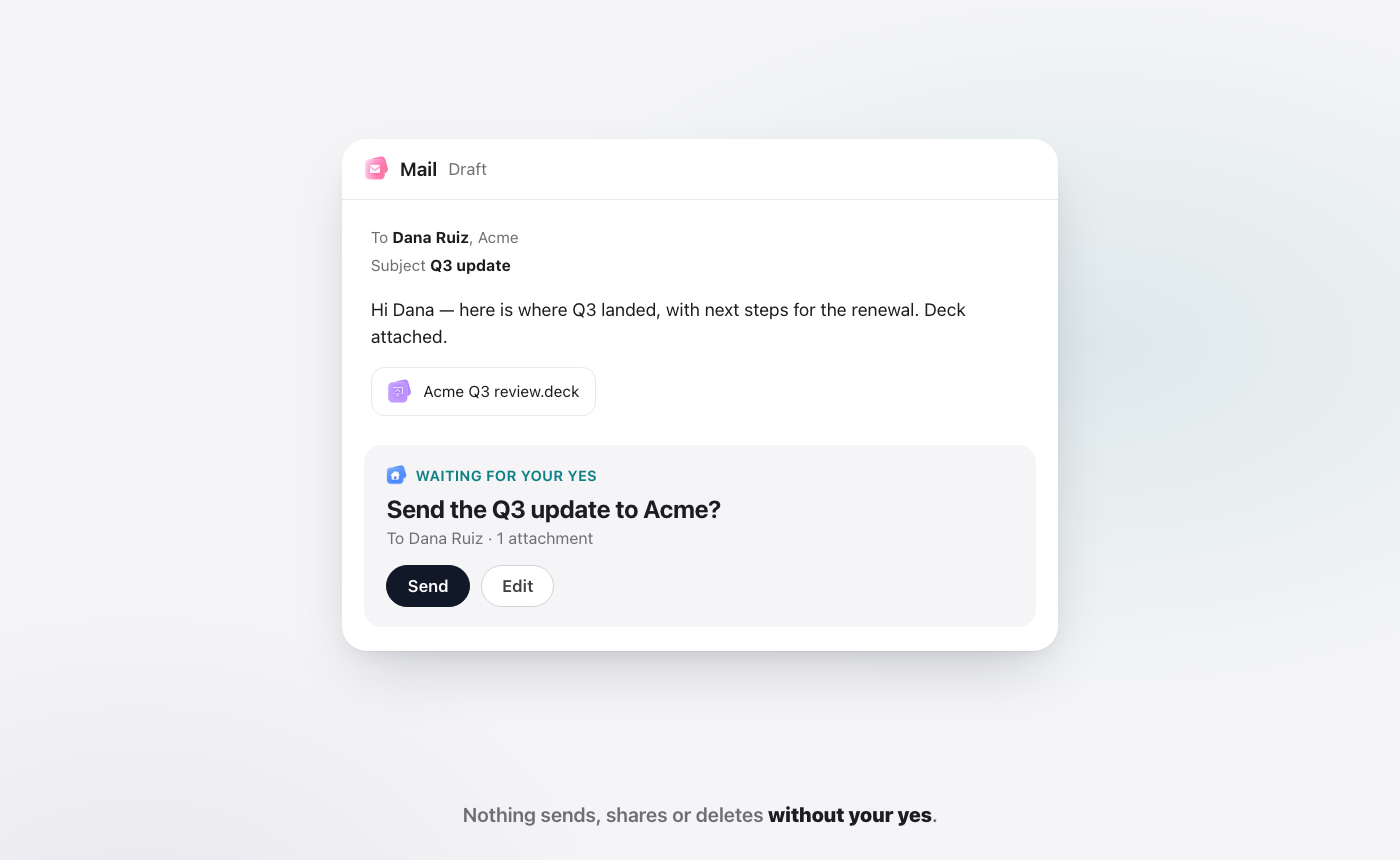
Nothing in Handled went out behind your back. Chief asks before anything is sent, shared or deleted, so "sent to Priya" is there because you approved it. And when Chief changes something, it re-reads the result and tells you if it did not work, so Handled means handled. We explain why that matters in visible progress vs actual progress.
Why does a "Because…" line change what you do?
A list tells you what. A reason tells you what to do about it.
Take "Approve the Umbrella invoice." On its own, it sits in the pile with everything else. Add "Because finance asked twice this week" and it moves to the top, because you now know someone is waiting and has already asked.
The reason also tells you when to ignore an item. "Brand refresh" with no reason might worry you. "Brand refresh. Because the client paused it last week" tells you it can wait, and saves you a message asking why it is stuck.
And reasons save the other person a follow-up too. When Neha can see that the brief is slipping because it is waiting on her review, she does not need you to tell her.
How does Start my day work on a real day?
Scenario. Brightline Studio, Acme and the people below are demo names, not a customer story.
Say you run Brightline Studio. It is Monday, 8:30, and you open WorkElate.
8:30. Start my day is ready. Under Needs you: "Reply to Dana at Acme. Because the renewal quote expires today." and "Approve the Umbrella invoice. Because finance asked twice this week." Under Slipping: "Brightline brief. Because it was due yesterday and Neha is waiting." Under Handled: "Acme review moved to 3 pm. Because Dana asked for later."
8:32. You take the top item. You click Review draft on the reply to Dana. Chief has drafted it: thanks for the updated quote, the terms work, signed copy by Thursday. You change one line and click Send. Nothing went out until you did.
8:40. You open the invoice. It is one click from the list. You approve it. Finance does not need to ask a third time.
8:45. You deal with the slipping brief. You open the Brightline brief, see what is missing, and ask Chief to draft a short note to Neha with the open question. You read it and send it. That is a follow-up, yes, but one you chose with the reason in front of you, not one you remembered at 6 pm.
9:10. You ask Chief to send Priya the Q3 numbers. It drafts the email from the Q3 Pipeline sheet, checks the figures match, and waits. You say yes. Tomorrow morning, that shows up in Handled: "Q3 numbers sent to Priya. Because you said yes at 9:10."
9:15. You are done with the chasing. The status meeting at 10 no longer needs a roll call of what is late. Everyone saw their own Slipping list before they walked in.
Which follow-ups are still worth sending?
Not every nudge is waste. The test is whether the follow-up carries something new.
Worth sending: a follow-up that adds a decision, a deadline the other person did not know about, or help. "The quote expires today, can we agree the terms by noon?" moves the work. So does "I've drafted the section you were stuck on, want to look?"
Not worth sending: a follow-up that only asks for status. "Any update?" makes the other person stop, open three apps and report back. If the status was visible to both of you, the question would not need asking.
Start my day is built to remove the second kind. The first kind stays, and gets easier, because the reason is already in front of you when you write it.
Chasing vs Start my day: what changes?
| Chasing by hand | Start my day | |
|---|---|---|
| How you find out what is late | A client or a colleague asks | It is in Slipping, with the reason |
| Where the picture lives | In your head, rebuilt each morning | In one view, ready when you open it |
| Why something matters | You have to work it out | A "Because…" line on every item |
| What got done | You check each app | Listed in Handled |
| What goes out | Whatever you remember to send | Only what you said yes to |
Who on a team uses Start my day?
Everyone who carries other people's work as well as their own. Here is what it looks like by role.
Founder. You see which client replies and approvals are on you, and which ones are slipping because they are waiting on you. The founder is often the bottleneck without knowing it. Needs you makes it visible.
Operations. Ops spends a lot of the week asking "where is this?" Slipping answers that before the question is asked, with the person who is waiting named in the reason.
Sales. Quotes expire, proposals go quiet, a prospect asked for a call next week. A "Because the quote expires Friday" line turns a cold deal into a reply you send today.
Account lead. You carry several clients at once. Start my day shows which client needs you this morning and why, so you stop opening every client's thread to check.
Finance. Invoices waiting on approval, a payment someone asked about twice. Finance sees what is stuck and who it is stuck on, without chasing the approver by message.
HR. An offer letter waiting on one signature, an onboarding form not yet filled, an interview that moved. Each shows up where it belongs, with the reason it is there.
Say you run a 30-person studio. Today the Monday status meeting exists mostly to find out what is late. If each person starts the day already knowing what needs them and what is slipping, that meeting gets shorter, or turns into a conversation about the work instead of a roll call.
What does Start my day not do?
It helps to be clear about the edges.
It does not end follow-ups. Some conversations need a person, a call, a nudge with care. Start my day means the follow-ups you send are the ones worth sending.
It does not send anything on its own. Chief can draft the reply or the nudge, but it waits for your yes. If you want an inbox that answers itself with no one looking, this is not that.
It only sees work in WorkElate. Start my day reads the suite's apps. A deadline that lives only in another tool, or only in someone's head, will not show up. The more of the work that lives in the suite, the more complete the picture.
It is not the only daily briefing on the market. Microsoft says Copilot Cowork can "start your day with a daily briefing that highlights what's ahead" (Microsoft Learn, Copilot Cowork overview, as of October 2026). If you live in Microsoft 365, that may be the natural place to start. What Start my day adds is the three groups, a reason on every item, and AI included on every plan. Our Google Workspace vs Microsoft 365 guide compares the suites in full.
How do you cut follow-ups in week one?
You will not see a quieter week if the work still lives elsewhere. Start by putting a slice of it in front of Chief.
Day 1. Open Start my day before your inbox. Read Needs you first. Notice which items you would have found only by chasing.
Day 2. Put one client or project in the suite. Its tasks with real due dates, its meetings on the Calendar, its thread in Mail. Start my day can only sort what it can see. One folder per client is the simplest way to do that.
Day 3. Act from the list. Use Review draft and Open instead of hunting through apps. Every approval you give shows up in Handled the next day.
Day 4. Count your "any update?" messages. Just for the day. It is a rough number, but it tells you where the gaps still are.
Day 5. Run the status meeting from Slipping. Ask each person to bring their Slipping list. See how much of the meeting was roll call.
FAQ
Why do follow-ups happen so often at work?
Follow-ups happen because the status of work is spread across email, task boards, calendars and documents, and nobody sees all of it at once. People fill the gap by asking. When the state of the work is shown in one place, with a reason for each item, fewer questions need asking.
What does Start my day show?
Start my day shows three groups: Needs you, Slipping and Handled. Every item carries a "Because…" line explaining why it is there, such as a quote that expires today or a colleague who is waiting. You can act on an item straight from the list.
Does Chief send follow-ups for me?
Chief can draft a reply or a follow-up for you, but it does not send it on its own. It waits for your yes. Nothing sends, shares or deletes without your approval, and anything it did with your yes shows up in Handled.
Do I need to connect my tools for Start my day to work?
No. Start my day reads the WorkElate apps, Mail, Tasks, Calendar, Docs, Sheets and the rest, which already share one Chief. There is nothing to connect, and AI is included on every plan. See Chief for more.
Is Start my day only for managers?
No. Anyone who waits on other people, or has people waiting on them, gets value from it. That is most of a team: sales, ops, finance, HR and account leads, not only the person at the top.
Start free and open your first Start my day.


