Microsoft 365 Copilot Alternative: AI Included, Not Added
In short
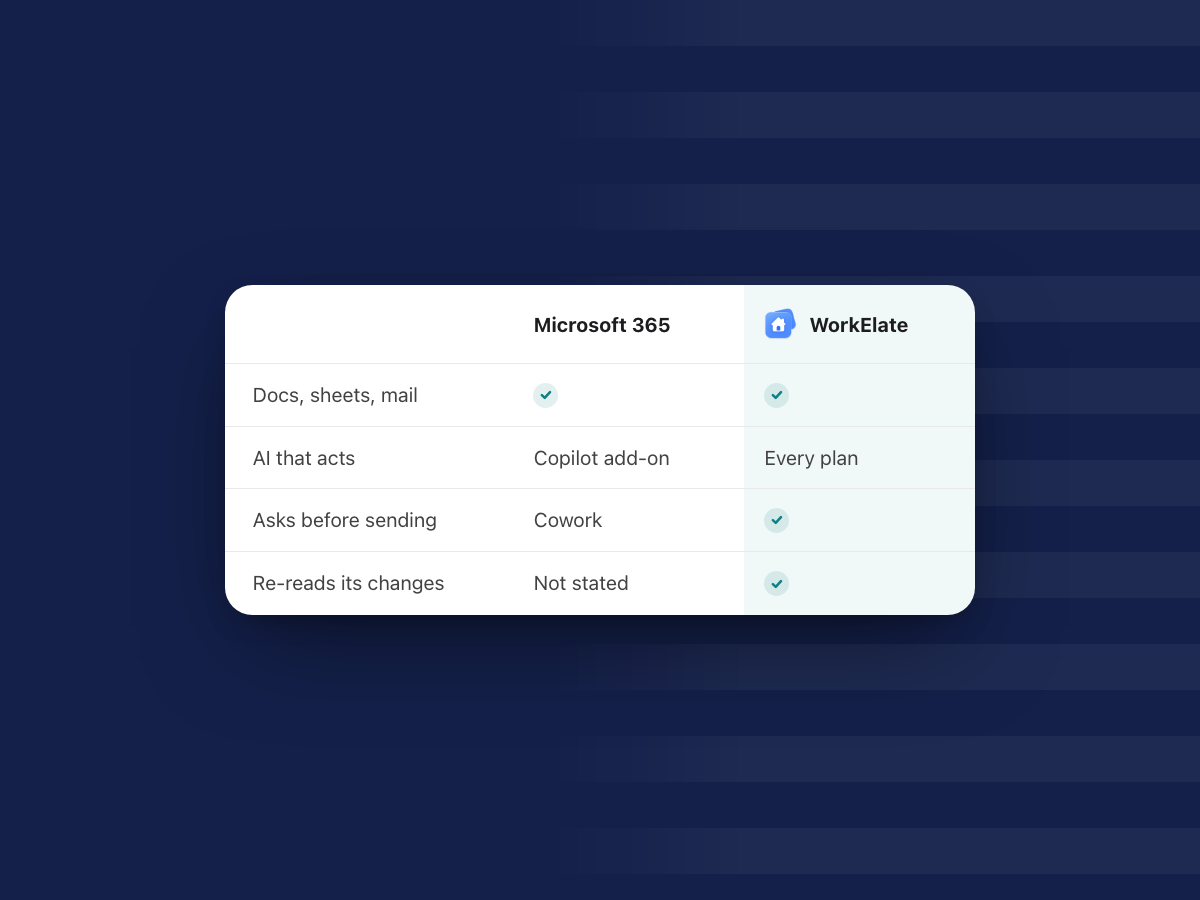
Microsoft 365 is a deep, trusted suite, and Copilot is a capable AI, but for a business team it is a second per-person license on top of the suite, with some acting features billed by usage.
If you are 10 to 200 people and want one AI that does the work across all your apps, asks before anything goes out and re-reads what it changed, an AI-native suite like WorkElate is the alternative to weigh; if you live in desktop Excel or need enterprise compliance, stay with Microsoft.
Most teams do not look for a Microsoft 365 Copilot alternative because Copilot is bad. They look because the renewal quote shows a second line item per person, and someone asks: is this the right AI for us, or just the AI that came with the suite we already had?
This post is for the founder, ops lead or finance lead who has to answer it at a 10 to 200 person company: what Copilot really costs, where Microsoft is plainly stronger, when an AI-native suite fits better, how to switch safely, and who should not switch.
All Microsoft facts below come from Microsoft's own pages, as of October 2026, with links. For the full side-by-side of the two big suites, read our Google Workspace vs Microsoft 365 guide.
What is Microsoft 365 Copilot, and what comes free?
There are two different things with similar names, and the difference matters for your budget.
Copilot Chat is included with eligible Microsoft 365 plans at no extra cost. Microsoft describes it as an AI chat that "primarily uses web data." To use your own work, you paste it in, upload a file, or use Copilot Chat inside Outlook or Teams with the content you have open (Microsoft Learn). Users without the add-on can still get "standard access" to Copilot in Word, Excel and PowerPoint, which Microsoft says is "subject to service capacity and might vary throughout the day."
Microsoft 365 Copilot is the paid add-on. With it, Copilot reads your emails, files, meetings and calendars on its own, and you get priority access in the apps. Microsoft lists what Copilot does there: in Word it drafts, rewrites and summarizes; in Excel it analyzes data and creates formulas and visuals; in PowerPoint it builds and edits decks; in Outlook it drafts emails and summarizes threads; in Teams it summarizes and transcribes meetings and captures action items (Microsoft Learn).
On top of that, Microsoft now sells Copilot Cowork, an agent that takes action, which we cover below, plus pre-built agents like Researcher and Analyst, and Copilot Studio for building your own (Microsoft 365 Copilot plans).
How much does Copilot add to a Microsoft 365 bill?
Here are the list prices on Microsoft's pages, as of October 2026, per user per month on an annual commitment:
- Microsoft 365 Business Basic: $7.00. Business Standard: $14.00. Business Premium: $22.00. These took effect July 1, 2026 (Microsoft licensing news).
- Microsoft 365 Copilot Business (the add-on for companies up to 300 people): $21.00, shown at a promotional $18.00 for the first year on an annual commitment, for offers between July 1 and December 31, 2026. Paid month to month, it is $25.20 (Microsoft 365 Copilot plans).
- Microsoft 365 Copilot for enterprise: $30.00, paid yearly, and "a separate license for a qualifying Microsoft 365 plan is required" (Microsoft Copilot enterprise pricing).
Microsoft also sells Business Standard and Business Premium bundles with Copilot built in. Check their page for the current bundle price before you budget, since offers change.
There is one more line to read. Microsoft's plan page says: "Some AI experiences require usage-based billing and may result in charges based on usage, beyond your license fees." Its FAQ names Copilot Cowork among them, measured in Copilot Credits. The page does not list a per-credit rate.
A worked example (a scenario, not a quote)
Say you run a 30-person studio on Business Standard and want Copilot for everyone.
| Per person, per month | 30 people, per month | 30 people, per year | |
|---|---|---|---|
| Business Standard | $14.00 | $420 | $5,040 |
| Copilot Business add-on, list | $21.00 | $630 | $7,560 |
| Total at list | $35.00 | $1,050 | $12,600 |
| Copilot Business, first-year promo | $18.00 | $540 | $6,480 |
At list price, the AI line is bigger than the suite line. And that is before any usage-based charges for Cowork.
Since Copilot is licensed per user, many teams buy it for a few people only. Then the AI helps only those people, and everyone else hands work to them.
WorkElate works the other way round. Chief, the AI, is included on every plan. There is no add-on. WorkElate's pricing is quote-based, so tell us your team size on the pricing page and compare the full number, not just the AI line.
Does Copilot act, or does it only assist?
This is where an honest comparison has to be careful, because the answer changed in 2026.
Most of Copilot inside Word, Excel, PowerPoint and Outlook is assistance. It drafts, summarizes and suggests, and you do the rest. That is useful, and for a lot of people it is enough.
Copilot Cowork is different. It acts. Microsoft says Cowork "sends emails, schedules meetings, creates documents, posts in Teams, and manages your calendar," and that "you approve each action before it happens" (Microsoft Learn: Cowork). It can edit existing Word, Excel and PowerPoint files, reorganize OneDrive and SharePoint folders, run prompts on a schedule, and prepare a daily briefing. For work and school accounts it is generally available.
So the line is not "Microsoft assists, WorkElate acts." The real differences are narrower and more practical:
- Cost and access. Cowork needs a Microsoft 365 Copilot license, Cowork turned on, and usage-based billing turned on (Get started with Cowork). In WorkElate, the AI that acts is on every plan.
- What happens after the action. Microsoft's own steps end with "Review the results ... check sent messages, or ask Cowork to make changes." The checking is yours. Chief re-reads every change it makes and tells you when something did not work.
- How often it asks. Cowork asks before important actions, with a risk level shown for medium and high risk ones. It also offers "Always allow" to skip future prompts for similar actions in the same conversation. Some people will like that. In WorkElate, nothing sends, shares or deletes without your yes.
If the question in your head is "will the AI do the task, or hand me a draft?", the deeper idea is in why AI should execute, not just assist.
Where does Microsoft 365 do better?
A fair answer, because if any of these decide it for you, you should stay.
Desktop Office. Business Standard and Premium include the full desktop Word, Excel and PowerPoint apps (Microsoft Learn: plan options). If your work runs on offline files, heavy macros or exact print layouts, nothing replaces them.
Excel depth. Finance models, large data sets, pivot-heavy reporting, Power BI on E5. Excel is decades deep, and Copilot in Excel sits on top of that.
Teams. Calls, meetings, transcripts and channels at very large scale, with Copilot summaries of meetings. If your clients expect a Teams link, that counts.
Admin, compliance and identity. Copilot respects user permissions, and admins get Copilot controls, an AI Administrator role, Purview to label data and review prompts and responses, and EU Data Boundary handling (Microsoft Learn). Business Premium adds Azure Information Protection on top.
Scale and storage. 1 TB of OneDrive per user on every Business plan (OneDrive service description) and a 100 GB mailbox (Exchange Online limits).
Agents and choice. Researcher writes source-cited reports from your work and the web (Researcher), Copilot Studio builds custom agents, and Copilot picks a model per task by default.
None of that is small. If clients audit your IT, Microsoft is probably the right choice.
Where does an AI-native suite fit better?
The case for an alternative is not "Microsoft is weak." It is that a 10 to 200 person team often needs something different from what Microsoft is built to do.
One AI for every person, not a few seats
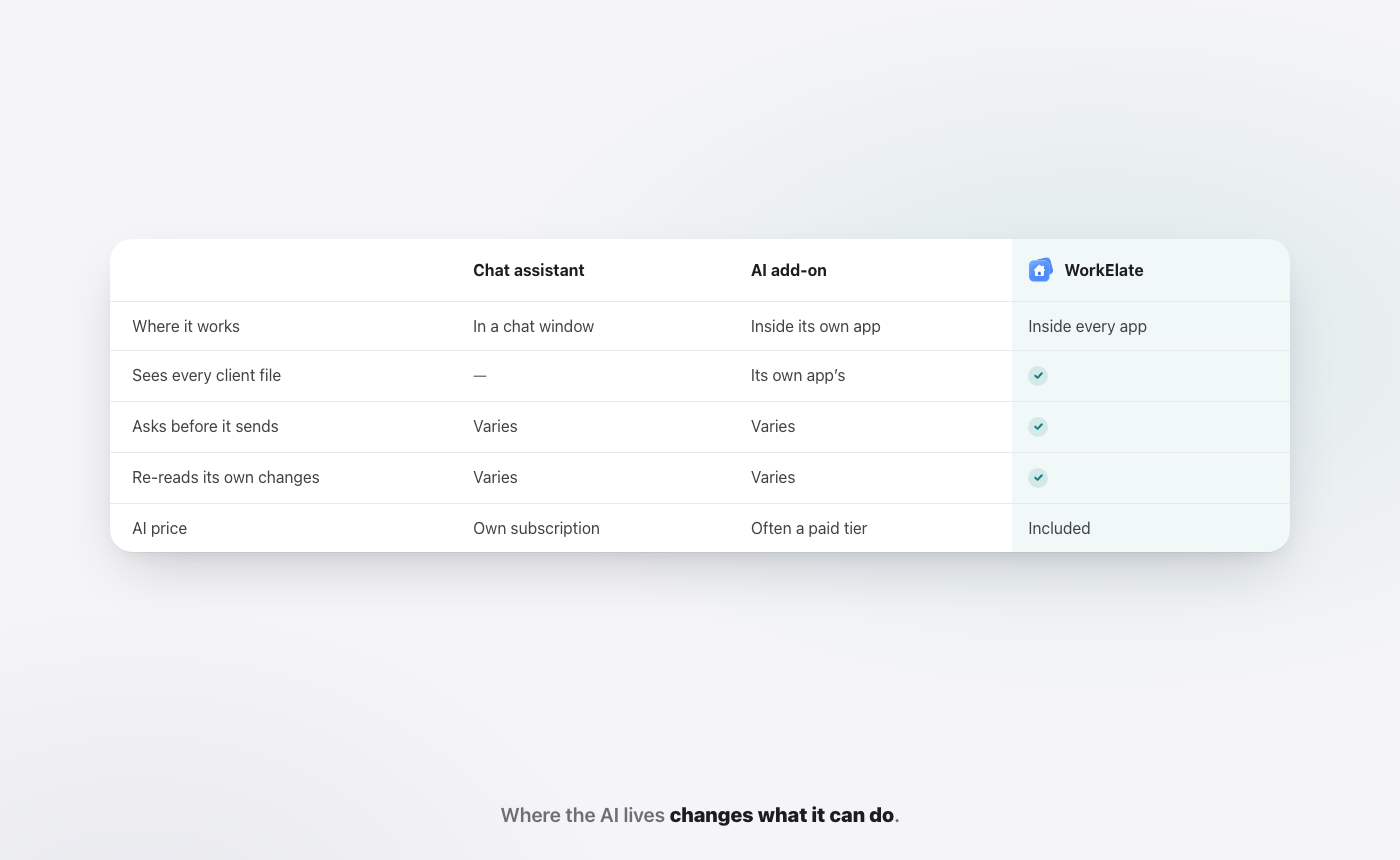
When the AI is a per-person add-on, it ends up on the founder's laptop and maybe the account leads'. Ops, finance and HR do without. In WorkElate, Chief is part of the suite, so the same AI helps the person sending the client update, the person chasing the invoice and the person drafting the offer letter.
The AI works where the work is, with nothing to connect
WorkElate is an AI-native office suite: Hub, Mail, Chat, Docs, Sheets, Slides, Calendar, Tasks, Canvas, Forms and Journey, with Chief across all of them. Chief acts across Docs, Sheets, Slides, Mail, Chat, Calendar, Tasks, Canvas, Forms and Journey, and Hub is home. There is nothing to connect. You do not paste a sheet into a chat window to get an answer about it.
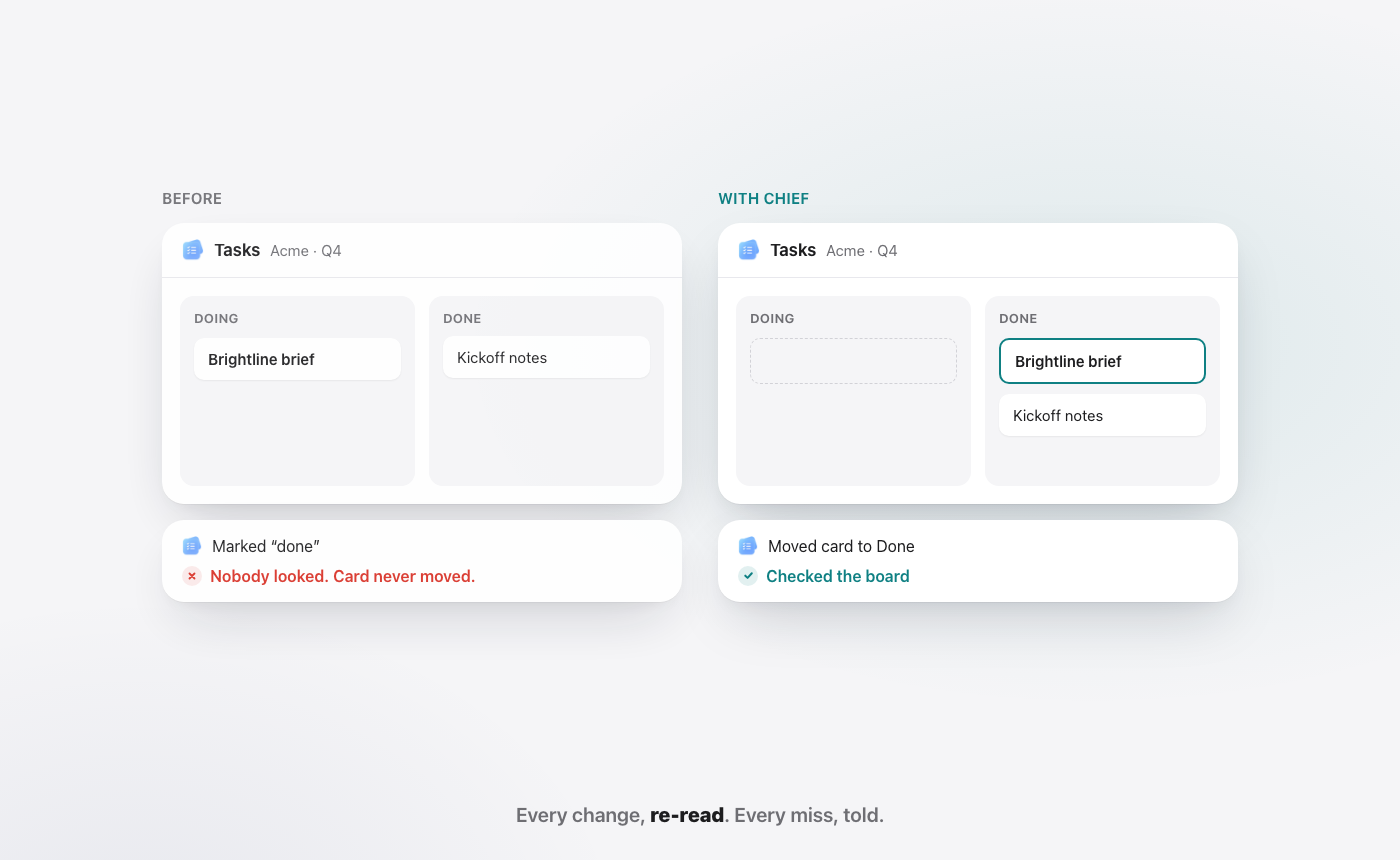
Say Priya Sharma asks for the Q3 numbers and wants the Acme review moved to Friday. Chief reads the Q3 Pipeline sheet, drafts the email in Mail, checks the figures against the sheet, and stops at "Waiting for your yes." Then it moves the meeting in Calendar and re-reads the calendar to confirm it landed.
Asks first, then checks
Chief asks before anything sends, shares or deletes. After it changes something, it re-reads the result, and if a change did not land, it says so in plain words. That is the difference between a card that says "done" and work that is done and checked, which we unpack in visible progress vs actual progress.
Start my day
Each morning, Start my day shows three lists: Needs you, Slipping and Handled, and every item comes with a "Because…" reason. "Reply to Dana at Acme, because the renewal quote expires today." "Brightline brief, because it was due yesterday and Neha is waiting." Microsoft's Cowork can prepare a daily briefing too, on a Copilot license. In WorkElate it is part of the suite.
One folder per client, or OneDrive and SharePoint?
Microsoft gives you two places for files. OneDrive is personal storage, and Microsoft's own description says storing "departmental and organizational level data" there is "not supported"; SharePoint is the place for team files (OneDrive service description). Mail lives in Outlook. Chats live in Teams. A client's work ends up spread across all four, and someone has to know where to look.
For a 30-person studio without IT staff, that usually means the brief is in someone's OneDrive, the budget is in a SharePoint library, the decision is in a Teams thread and the latest numbers are in an email attachment.
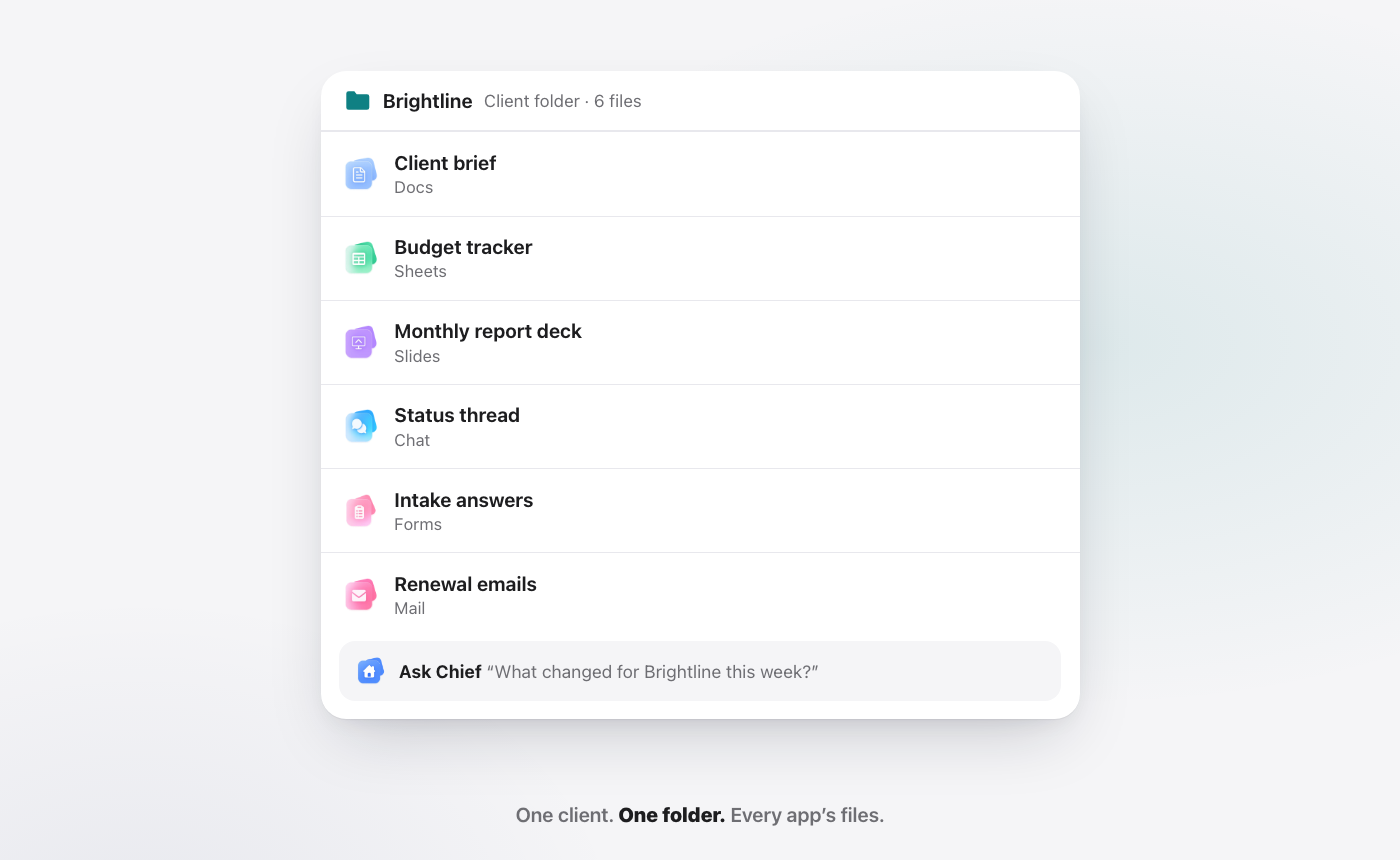
In WorkElate, one folder per client holds every app's files: the brief in Docs, the budget in Sheets, the deck in Slides, the chat thread and the form answers. Chief reads all of it. So "what did we promise Acme, and is the budget still right?" is one question, not a search across four apps. More on why that matters in all-in-one vs disconnected tools.
Microsoft 365 with Copilot vs WorkElate: side by side
| Microsoft 365 + Copilot (as of October 2026) | WorkElate | |
|---|---|---|
| AI in the plan | Copilot Chat included; full Microsoft 365 Copilot is a separate license ($21 list on Business, $30 enterprise) | Chief included on every plan, no add-on |
| AI that acts | Copilot Cowork: Copilot license plus usage-based billing | Chief acts across Docs, Sheets, Slides, Mail, Chat, Calendar, Tasks, Canvas, Forms, Journey |
| Asks before sending | Cowork asks before important actions; "Always allow" can skip similar prompts in a conversation | Nothing sends, shares or deletes without your yes |
| Checks its own work | Microsoft says you review the results | Re-reads every change, tells you when one did not land |
| Client files | OneDrive (personal) and SharePoint (team), plus Outlook and Teams | One folder per client holding every app's files |
| Desktop apps | Full desktop Word, Excel, PowerPoint on Standard and Premium | Not the focus; Excel-heavy teams should stay |
| Admin and compliance | Deep: Purview, Copilot controls, AI Administrator role | Simpler; see the security page |
| Best for | Enterprises, regulated firms, Excel-heavy teams | 10 to 200 person teams that want one AI doing the work across all apps |
For the short version of this table, see WorkElate vs Microsoft 365.
How do you switch from Microsoft 365 without breaking anything?
You do not have to switch everything at once, and you should not.
What moves first. Pick one client, or one internal team, and run their work in WorkElate: the client's docs, sheets, decks, threads and forms in one folder, with Chief doing the follow-ups and status updates. That is enough to see whether the AI saves time for real.
What stays. Keep Microsoft 365 for everything else during the trial: your domain email, finance models that depend on desktop Excel, and any client who insists on Teams. Nothing about starting WorkElate forces you to cancel a Microsoft seat.
How long. Give the pilot two to four weeks of real work, not a demo afternoon. One week is too short to see the follow-ups Chief handled or the misses it flagged.
Running both. Most teams run both for a while. The test: are the people on that client spending less time copying, chasing and checking? If yes, move the next client. If no, your Microsoft setup is untouched.
Renewal timing. Microsoft's prices changed on July 1, 2026, and existing customers keep their current price until renewal (Microsoft licensing news). Start the pilot a couple of months before your renewal so you decide with evidence, not under deadline.
Who should not switch?
Be honest with yourself here. Stay with Microsoft 365 and Copilot if:
- You run on desktop Excel. Complex models, macros, large data. Copilot in Excel on top of real Excel is hard to beat.
- You have more than a few hundred people, or IT policies built on Entra ID and Purview. Microsoft's admin depth is the point.
- Your clients require Microsoft. If contracts say "files in SharePoint, meetings in Teams," that decides it.
- You are regulated and your auditors already know Microsoft's controls.
- Your team only wants drafts. If people want help writing and summarizing, and not an AI that does tasks, the included Copilot Chat may already be enough.
FAQ
What is the best Microsoft 365 Copilot alternative for a small team?
It depends on what you need the AI to do. If you want an AI that acts across your docs, sheets, mail and calendar, asks before anything goes out and is included in the plan, an AI-native suite like WorkElate is the alternative to test. If you mostly need Excel, Teams and enterprise admin, Microsoft 365 with Copilot Chat may already cover you.
Is Copilot included in Microsoft 365 Business plans?
Copilot Chat is included with eligible plans at no extra cost, as of October 2026. The full Microsoft 365 Copilot, grounded in your emails, files and meetings, is a separate per-user license: Copilot Business lists at $21.00 per user per month on an annual plan, with a first-year promotional price of $18.00 for offers through December 31, 2026 (Microsoft).
Does Copilot ask before it sends an email?
Copilot Cowork does. Microsoft says it pauses and asks for your go-ahead before important actions like sending an email or scheduling a meeting, and lets you choose "Always allow" for similar actions in that conversation. In WorkElate, Chief asks before anything sends, shares or deletes, and re-reads every change after.
Can I use WorkElate and Microsoft 365 at the same time?
Yes. Most teams start WorkElate on one client or one team while Microsoft 365 keeps running everything else. If the pilot works, you move the next client. If not, nothing in your Microsoft setup has changed.
Is the AI an add-on in WorkElate?
No. Chief, the AI, is included on every plan. There is no add-on and nothing to connect. WorkElate pricing is quote-based; see the pricing page.
Start free and run one client in WorkElate next to your Microsoft 365 setup.


